Attribution
Tracking links, promo codes, confidence tiers, and why an empty Attribution tab usually means a missing destination link.
Attribution answers one question: which creator drove this sale. Cyrqle gives each creator a tracking link and a promo code, counts the clicks, and matches completed orders back to the creator who earned them.
Before you start
No destination link means nothing is tracked
Cyrqle mints a creator's tracking links only when the brief has a destination URL, or your workspace has a connected storefront. With neither, no link is created, the creator sees nothing to share, and this tab stays empty forever. Set the destination link on the Brief tab first. See The Brief tab.
You also need:
- A connected store for click-based and order-based tiers. See Integrations.
- Promo codes for in-store and offline sales.
- Creators who have accepted. Links and codes are minted on acceptance.
How attribution works
Cyrqle files every attributed order into one of three tiers.
Every creator link carries a short code. When a shopper clicks it, your storefront records the visit through the Cyrqle snippet and remembers that visitor for up to thirty days. When an order completes, your store tells Cyrqle, and Cyrqle credits the most recent creator link the buyer used inside the window. A refund reverses the credit, so revenue is always net of refunds.
Steps
Set the destination link on the brief
Everything below depends on it.
Connect your store
Install the tracking snippet and the order webhook, including the refund event. See Integrations.
Invite creators and let them accept
Cyrqle mints one tracking link per deliverable row and one promo code per creator on acceptance.
Click Mint codes
Cyrqle creates one code per active creator. Creators who already have one are skipped.
Read the tab once posts are live
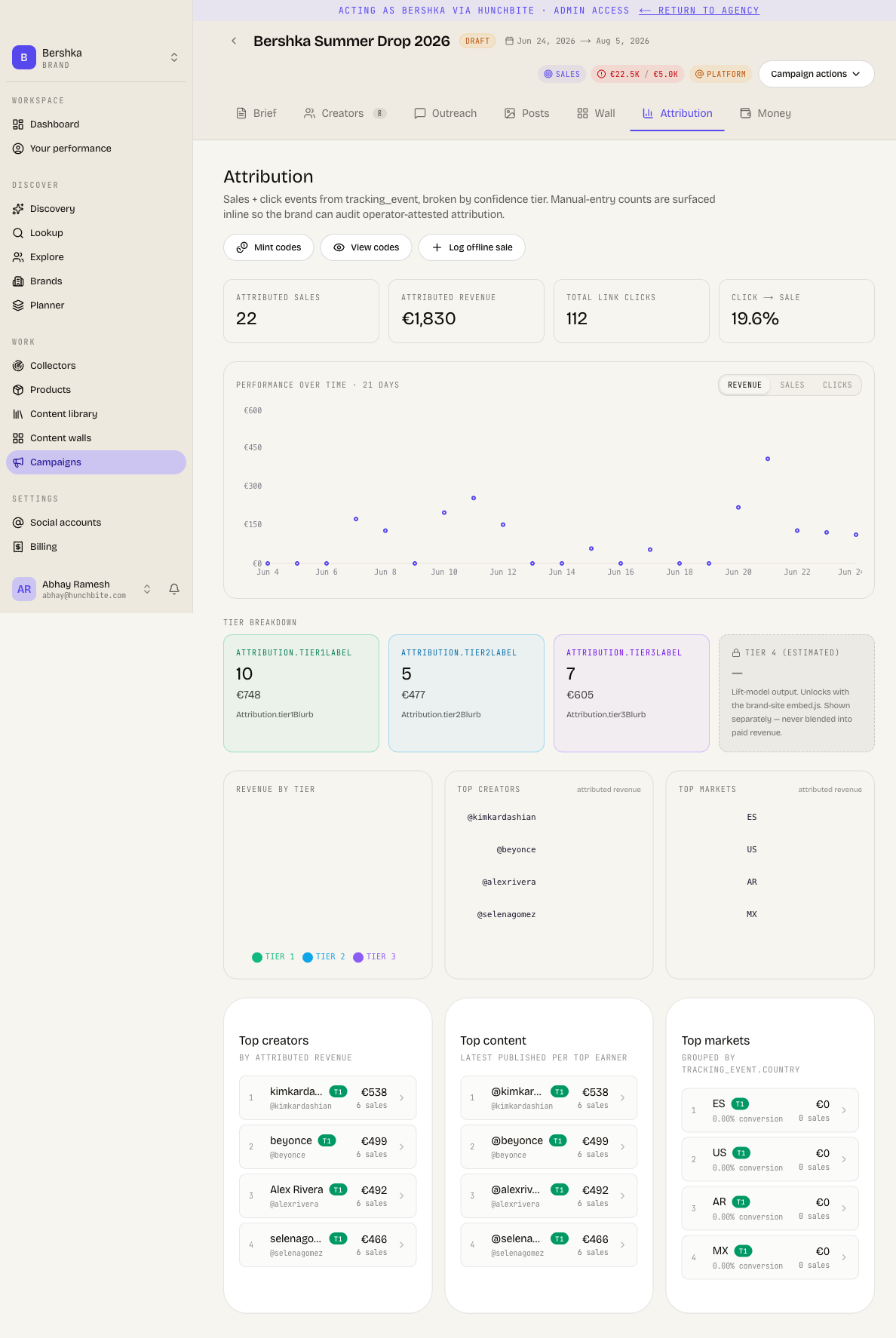
The tab shows attributed sales, attributed revenue, total link clicks and the click-to-sale rate. It adds a revenue chart and scorecards for top creators, top content and top markets.
Confidence tiers
| Tier | What it means |
|---|---|
| Tier 1 - promo code | The buyer redeemed the creator's promo code. The strongest evidence. |
| Tier 2 - same-session | The purchase happened within 30 minutes of the creator's link click. |
| Tier 3 - cookied later | The buyer was seen on an earlier click within 30 days, or no click was matched at all. |
| Tier 4 (estimated) | A modelled estimate of influence. Coming soon. |
Read the two weakest tiers carefully
- Tier 3 is the catch-all. A sale that Cyrqle cannot match to any click is also filed as Tier 3. The tier label says "cookied later", which overstates the evidence. Read Tier 3 as the weakest attributed tier.
- Tier 4 has no data behind it today. The card is a placeholder and never fills. Lift estimates are coming soon, and are never blended into paid revenue.
Record a sale that happened offline
Open Record offline-attributed sale for in-store redemptions and reconciliations. Pick the creator, or type their promo code to select them. Enter the amount, pick the tier and write the required reason. Cyrqle labels these as operator-recorded so they stay auditable.
An offline sale needs the creator to have a tracking link. If they have none, Cyrqle refuses the entry. Mint the code and the link first.
Pitfalls
- A creator who shares your raw address registers nowhere. Clicks count only through the Cyrqle short link. A creator who pastes your own website address instead is invisible in every click number on this tab, even though the traffic is real.
- Link previews in messaging apps follow the link without counting a click, so Cyrqle's click numbers read lower than your own site analytics.
- Revenue is net of refunds, so a heavily refunded day can show negative revenue on the chart. That is correct, not a fault.
- An unreadable code still records the sale, credited to nobody. If the short code on an order cannot be resolved, Cyrqle keeps the sale as an organic one with no creator. It then disappears from every campaign total. A typo and a code from another brand give the same result and the same message.
- On Shopify, Cyrqle creates the real discount behind a promo code once, with no retry. If your store was unreachable at that moment, the creator holds a code with no discount behind it. Check a code in your store admin before a launch.