Agreements
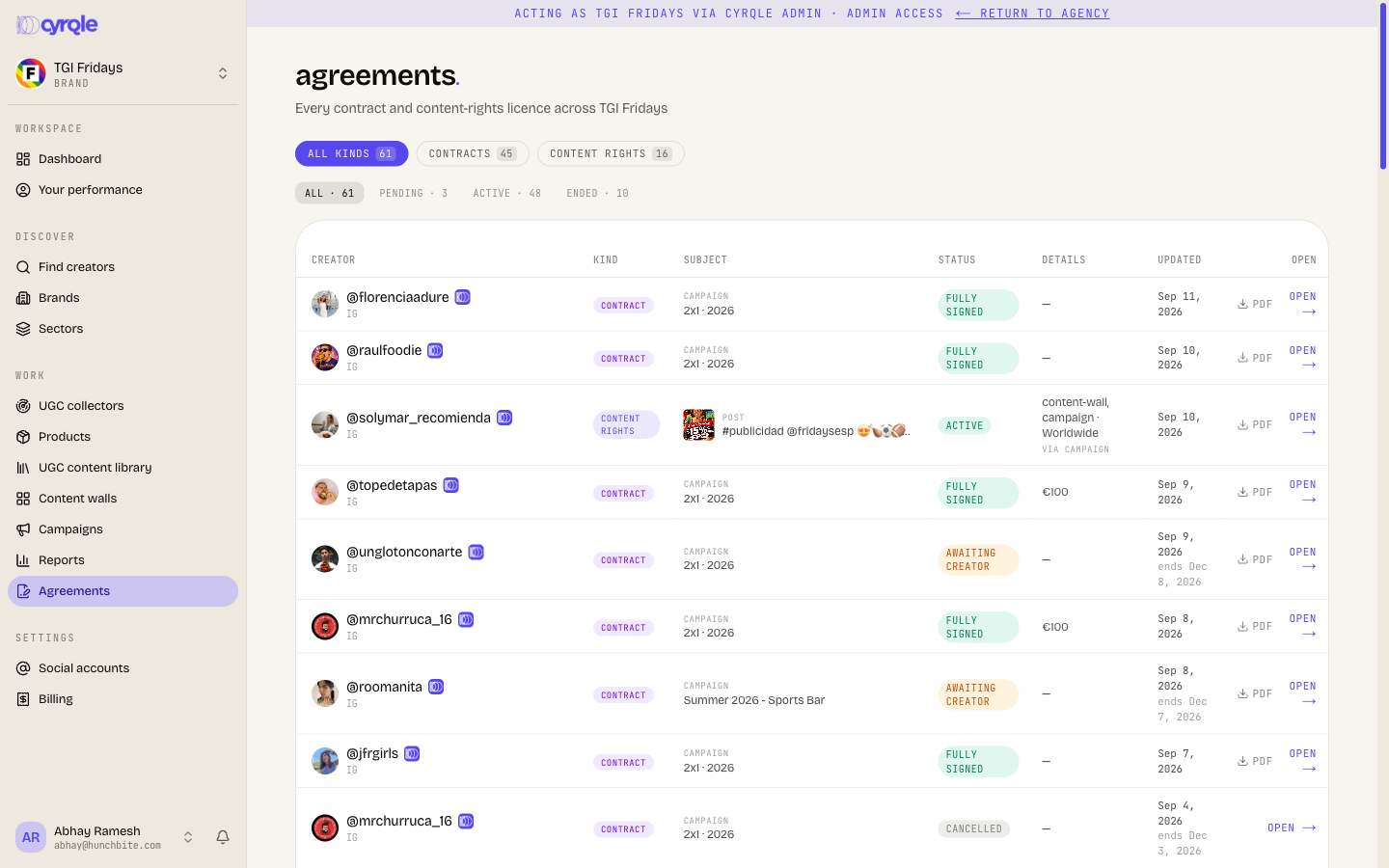
One table for every agreement you hold with a creator: signed campaign contracts and content-rights licences.
A Contract row is the e-signed campaign agreement. A Content rights row is a licence to use a post. Use the page to answer "what do we hold on this creator" without opening each campaign.
Before you start
- Select Agreements in the sidebar, under the campaigns group.
- The page reads existing records. You cannot create, edit or cancel an agreement here. Each row links to the screen that owns it.
- The page covers the whole workspace, not one campaign.
- A row appears only after you send a contract, or after a creator grants rights. An empty page reads "No agreements here".
Steps
Narrow to one kind
Select All kinds, Contracts or Content rights in the top row of pills. Each pill carries its own count.
Narrow to one stage
Select All, Pending, Active or Ended in the second row. The stage means the same thing for both kinds.
Read the row
Subject shows the campaign for a contract, and the post for a licence. Details shows the agreed rate for a contract, and the usage and territory for a licence.
Open the record
Select Open on the right. A contract awaiting signature opens its signing page. Any other contract opens the campaign Outreach tab with that creator selected. A licence opens the content library.
Save a copy
Select PDF on the row. Cyrqle serves the signed document for a contract, and the licence document for a rights row.
Opening a pending contract opens the creator's signing page. Do not sign on the creator's behalf. Signing there records the creator as the signer, with your IP address in the audit trail.
What the stages mean
Both kinds collapse into three stages, so one filter works across the table.
| Stage | A contract is here when | A licence is here when |
|---|---|---|
| Pending | Someone still owes a signature | The creator has not answered the request |
| Active | Both parties signed | The licence is in force |
| Ended | The contract was cancelled | The licence expired or was revoked |
The Status column keeps the exact status behind the stage.
| Status pill | Meaning |
|---|---|
| Awaiting creator | You signed. The creator has not. |
| Awaiting brand | The creator signed. You have not countersigned. |
| Fully signed | Both parties signed. Production can start. |
| Cancelled | You withdrew the contract before it was signed. |
| Active | The rights licence is in force. |
| Expired | The licence reached its end date. |
| Revoked | The creator withdrew the licence. |
Where a licence came from
A content-rights row carries a small "via" label under its details. It tells you which route produced the licence, and that route decides who to ask when you need the licence changed.
| Label | Route |
|---|---|
| UGC | The creator granted it on a rights request you sent |
| Campaign | The campaign contract licensed it |
| Fan | A fan accepted the terms of a fan activation |
| Manual | Cyrqle staff recorded it for you |
Pitfalls
- An Ended licence means a wall stops showing that post on its next refresh. Check this page before you tell a client a post stays up.
- The Updated column shows the date a contract was fully signed, or the date a licence was granted. A second line reading "ends" is the signing-link expiry for a pending contract, and the licence end date for a rights row.
- A contract with no signing link left opens the Outreach tab instead, and it offers no PDF. Mint a new contract from the campaign if you need a fresh document.
- The table lists the whole workspace and has no search box. Use the kind and stage pills to cut it down. A workspace with many campaigns produces a long table.