Sectors
See which sectors the creator index actually covers, how deep each one is, and which brands, creators and hashtags define it.
Read Sectors before you plan a search, so you know whether a sector holds enough creators to be worth filtering on.
Before you start
- Sectors is available to brand and agency workspaces.
- The page is read only. Nothing here changes your workspace.
- Counts grow as Cyrqle scores more creators.
Steps
Read the table
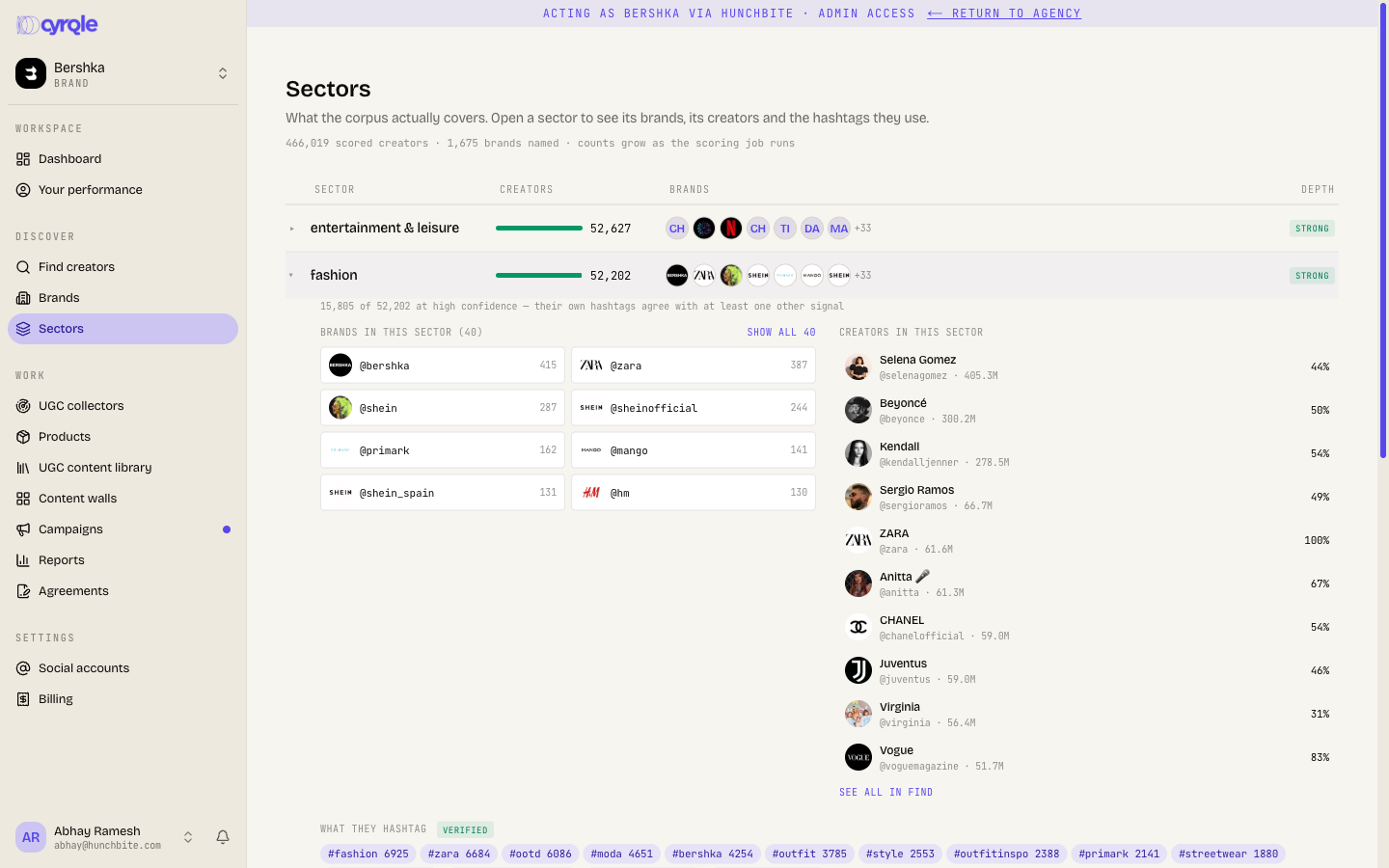
The header counts the scored creators and the brands named across all sectors. The table has four columns: Sector, Creators, Brands and Depth.
Depth compares a sector to the largest sector in the index:
| Chip | Meaning |
|---|---|
| strong | 50% or more of the largest sector. |
| medium | 15% or more of the largest sector. |
| thin | Below 15%. Expect few results when you filter on it. |
| none resolved | Cyrqle has no brands linked to this sector. |
Open a sector
Click a row to expand it. The expanded row shows:
- How many of the sector's creators are at high confidence.
- The brands in the sector. Click show all to see past the first 8.
- The top 10 creators, each with the share of the sector they carry.
- A see all in Find link. It opens Find creators with that sector set and its strength set to 40%+.
- The top 14 hashtags in the sector, with how often they appear.
How a creator gets a sector
Cyrqle runs three signals over a creator and combines them: the hashtags they use, the text of their posts, and the subjects in their images. A creator can hold more than one sector.
- The weight percentage is the share of that combination the sector carries.
- Confidence is high only when the creator's own hashtags agree with at least one other signal.
The three-signal sector is newer than the sector list on some older filters. Cyrqle keeps the older list working during the change, so the two can disagree on a creator.
Correct a sector
If Cyrqle put a creator in the wrong sector, open that creator's evidence page and record a verdict: correct, wrong, or not a creator. Choose the right sector when you mark one wrong. Cyrqle stores your verdict separately, so a later rescore never overwrites it.
There is no link from Sectors to the evidence page. Open the creator from Find creators, then open their evidence page from there.
Pitfalls
- The page caches for 15 minutes and the cache is shared by everyone. The first load after the cache expires takes about half a minute.
- The brand list in a sector is built ahead of time and shipped with the product. A brand you add to the catalogue today does not appear here until Cyrqle rebuilds that list. The same list also admits common first names and generic words as if they were brands.
- A thin sector is a warning about your search, not about the creators. Filtering Find creators on a thin sector, especially at 40%+ or 60%+ strength, can return almost nothing.
Reference
| Limit | Value |
|---|---|
| Brands listed per sector | 40, collapsed at 8 |
| Creators listed per sector | 10 |
| Hashtags listed per sector | 14 |
| Cache | 15 minutes |