Lists
Save creators into a list, import a batch of handles, compare lists side by side, model a budget, invite creators to Cyrqle, and push a list into a campaign.
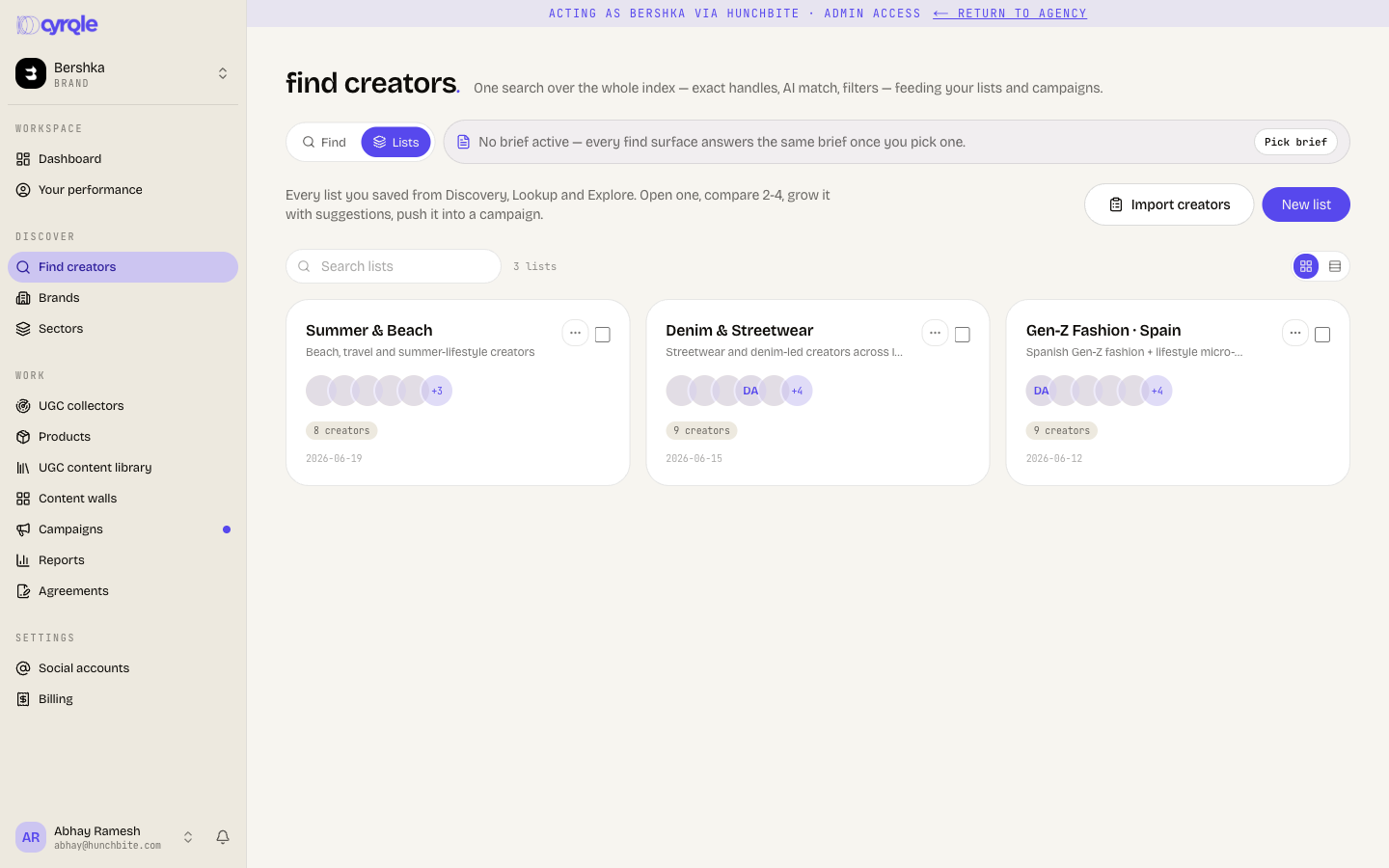
A list is a saved set of creators, and optionally saved posts. Lists is the second tab on the Find creators page.
Before you start
- Lists is available to brand and agency workspaces only.
- This page replaces the old Planner. The Planner route no longer exists. Everything it did lives here.
- Your plan sets how many lists the workspace may hold. Cyrqle checks the cap when you create the list, not before.
- To add creators to a list you need the editor level on the workspace.
- Some actions here pull live data or send real email. Each one is marked below.
Steps
Create a list
Open Lists
Open Find creators and select the Lists tab.
Start a new list
Click New list.
Name it
Enter a Name of 2 to 80 characters. Add a Description if you want one.
Save
Click Create list.
You can also save straight from a search. Click Add to list on any result card, then pick a list or type a new name.
Import creators in bulk
Open the import dialog
Click Import creators.
Paste or upload the handles
Paste handles or profile links, one per line. You can also click Upload CSV.
Match them against the index
Click Match handles in Cyrqle. This step is free.
Fetch the missing profiles
Cyrqle shows how many handles it holds, how many it must fetch, and how many it cannot fetch. Click Fetch profiles to pull the missing ones from the network.
Save them into a list
Click Save creators to a list, then pick or name the list.
What Fetch profiles costs and covers
- Fetch profiles pulls live data and spends credits. The dialog does not state the credit cost. Cyrqle fetches at most 100 profiles per run and asks you to run again for the rest.
- Only Instagram and TikTok handles can be fetched. YouTube, X and LinkedIn handles are reported as unsupported.
- Some fetched profiles land but stay unsearchable. Cyrqle says so: their profiles were too sparse to classify. They are in the list, but they do not come back in a search.
Open a list
A list page shows, in order: invite batches, creators, saved content, similar creators and the budget scenario.
- Members reveal 60 at a time. Click Show 60 more or show all.
- similar creators suggests the closest creators to the list's centre of gravity. It needs at least two embedded members.
- Saved content appears only when the list holds posts.
A list shows at most 100 saved posts, with no note that more exist.
Model a budget
The budget scenario section sits at the bottom of a list. Drag the slider between 500 and 100,000 euros.
Cyrqle shows four numbers:
| Number | How Cyrqle calculates it |
|---|---|
| Impressions | Budget divided by a placeholder CPM of 15 euros, multiplied by 1000. |
| Engagement | Impressions multiplied by the average engagement rate of the members. |
| Creators in scope | Every member if the budget per member reaches the 275 euro median fee estimate. Otherwise none. |
| Cost per result | Budget divided by engagement. Shown as a dash when engagement is zero. |
- The budget scenario is a what-if. Cyrqle does not save it, and it does not change the campaign. The 15 euro CPM and the 275 euro median fee are placeholders until real rates load.
- The average engagement rate skips members whose engagement rate is zero or unknown. A list with thin data reads higher than it should.
Compare lists
Select the lists
Click Select on 2 to 4 lists.
Open the comparison
Click Compare selected.
Each column shows reach, impressions, engagement and an estimated cost band. It also shows the top 3 sectors, the top 3 countries, and how many creators it shares with the first column. The difference table adds engagement rate and estimated impact media value.
- Overlap is measured against the first column only, never between the other columns. Reorder the columns to compare a different pair.
- Compare takes up to 4 lists. Extra selections are dropped without a message.
Invite the creators to Cyrqle
Send to sends real cold email at once. There is no preview and no test send. Read the message and the recipient count before you click.
Open the invite dialog
Open the list and click Invite to Cyrqle.
Read the reachability line
Cyrqle shows how many members have an email, how many are already on Cyrqle, and how many are unreachable.
Choose who sends
Under Invite as, pick the platform or your brand.
Pick the language
Choose Language, or leave it on auto.
Write the message
Enter a short message. It appears in the email.
Send
Click Send to with the count shown.
What an invite send does
- A creator counts as reachable when Cyrqle has an email for them, or when they are already on Cyrqle. A phone number alone does not make a creator reachable, even though a phone badge is shown.
- Your message goes out word for word and is not translated. Only the email wrapper is translated. Cyrqle picks the language from the creator's country, which is often missing, and then falls back to English.
- Revoking an invite link cannot be undone. It also breaks every invite email that batch already sent.
- Each send mints a new invite link first, so repeated sends build up link rows on the list.
- Cyrqle meters each invite message at 0.1 credits. See Billing and credits.
Push a list into a campaign
Open the list and click Add to campaign. A brand workspace can choose Start a new campaign or Add to an existing campaign. An agency workspace can only start a new campaign.
Add to campaign stays clickable on an empty list. The error appears only after you pick a campaign and click add to pool. Add at least one creator first.
Share a list
Use the row menu to turn Enable share link on. Anyone signed in to Cyrqle with the URL can then open the list, copy it into their own workspace, and add it to their own campaign.
Copy link copies the URL whether or not sharing is on. If sharing is off, the person you send it to gets a page-not-found error. Turn sharing on first.
Pitfalls
- Deleting a list is permanent. The list, its members and its saved posts all go. The creators themselves stay in Cyrqle. A bulk delete removes up to 100 lists behind one confirmation.
- Duplicating a list clears every fit score. The copy shows a dash until you search again.
- A bulk duplicate stops at the first failure. If the plan cap hits on the third list of five, the first two copies exist and the rest do not.
- The plan cap on lists is checked only when you click create. The message asks you to delete a list or upgrade.
- Adding creators or posts silently drops any handle Cyrqle cannot resolve. You get an error only when nothing at all resolves.
- The edit link on the compare page does not open the list. Go back to the Lists tab and open the list from there.
Reference
| Limit | Value |
|---|---|
| Lists shown on the page | 100 |
| Creators or posts per create | 200 each |
| Creators or posts per add | 200 |
| Creators or posts per remove | 5,000 |
| Lists per bulk delete | 100 |
| Members revealed at a time | 60 |
| Saved posts shown | 100 |
| Lists per comparison | 4 |
| Similar-creator suggestions | 20 |
| Invite recipients per send | 500 |
| Handles per bulk fetch | 100 |
| List name | 2 to 80 characters |
| Description | 500 characters |