Deliverables and posts
What Cyrqle can track, how published posts arrive on the Posts tab, and how often their numbers refresh.
Deliverables are what you asked each creator to publish. The Posts tab is what they actually published, with reach, views and engagement against it.
Before you start
- Author the deliverables on the Brief tab. Cyrqle counts delivery against them and mints one tracking link per row.
- Set the destination link, or no tracking link exists to count clicks. See The Brief tab.
What Cyrqle can track
Only Instagram and TikTok are tracked today
Cyrqle collects metrics for Instagram posts, carousels, reels, stories and videos, and for TikTok videos and carousels. Nothing else is collected. You can write a YouTube, X, Facebook or LinkedIn deliverable into the brief. The stepper is greyed out, carries a soon suffix, and its plus control is disabled.
| Platform | Offered | Tracked | Locked |
|---|---|---|---|
| post, carousel, reel, story, video, live | post, carousel, reel, story, video | live | |
| TikTok | video, carousel, story, live | video, carousel | story, live |
| YouTube | video, short, live | none | all |
| X | post, video | none | all |
| post, carousel, reel, story, video, live | none | all | |
| post, carousel, video | none | all |
Stories close, but report almost nothing
Cyrqle can confirm that a story ran. It can only read story reach, views and saves when the creator has connected their Instagram account. A story-led campaign whose creators have not connected Instagram reports near-zero story engagement. Stories also last 24 hours, so a story posted and expired between two collection runs cannot be recovered.
Read the Posts tab
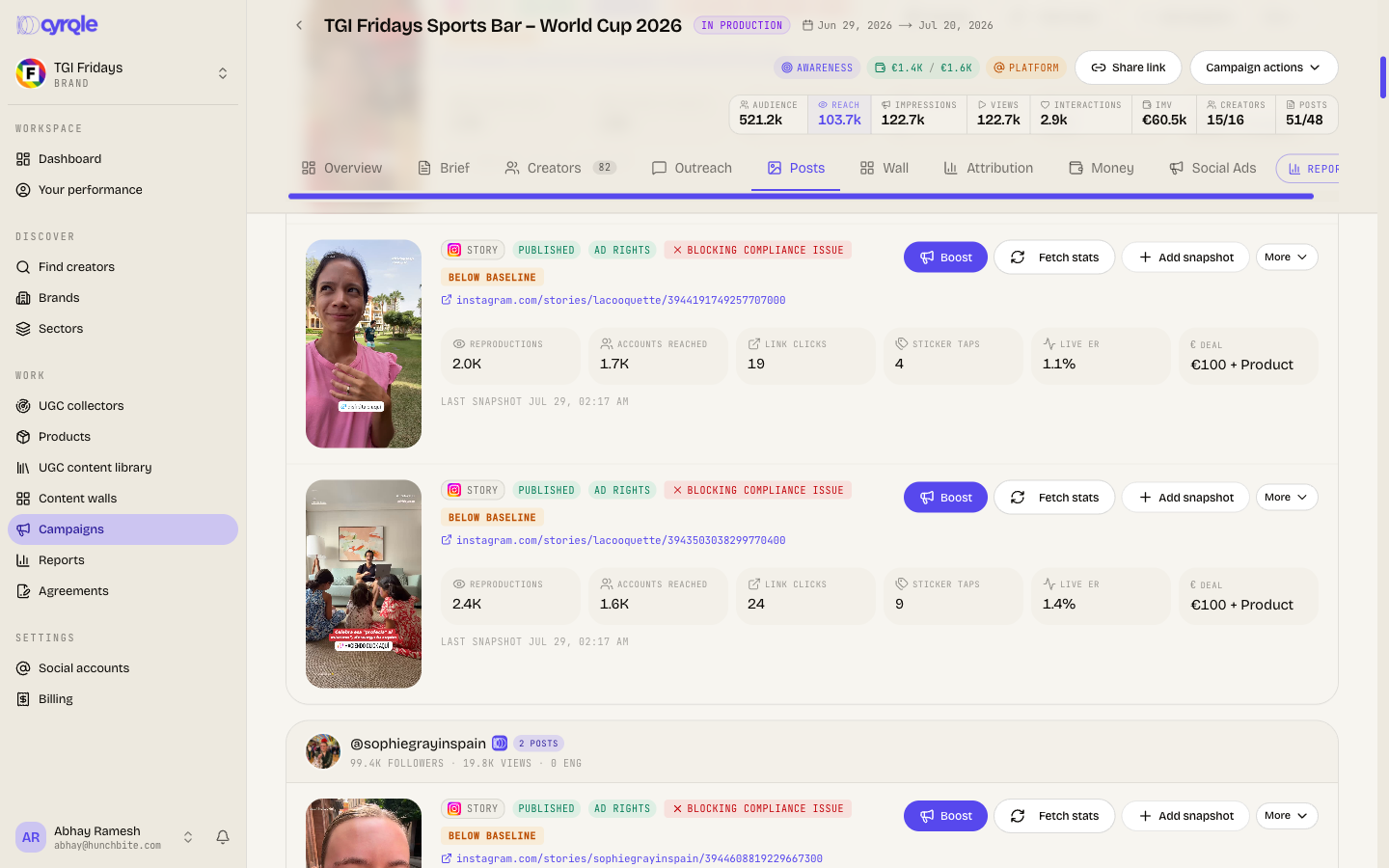
Each row is one published post with its platform, format, creator and metrics.
- reach (est.) counts owner-connected accounts only.
- total views is views plus impressions.
- The tab also shows effective cost per thousand impressions against a paid-ads benchmark, and effective cost per like and comment.
- A header line counts deliverables met, how many creators are complete, what is outstanding, and how many posts are off-plan.
- Each row carries an Ad rights or No ad rights badge. See Social Ads.
Add a post that Cyrqle missed
Adding a post yourself skips the creator's completion
A creator who submits their own live post address is marked delivered. Cyrqle then starts the payout, bridges the post into your content walls and grants the content rights. None of that happens when you add the post yourself. Cyrqle only inserts the row and fetches its numbers. Ask the creator to submit the address whenever you can.
Click Add post manually
The dialog is titled Add a published post.
Paste the live post address
Cyrqle recognises Instagram, TikTok, YouTube including Shorts, X and Facebook, and detects the platform and format.
Save the post
Cyrqle fetches the numbers straight away where it can. If it cannot, add a snapshot by hand instead.
Refresh the numbers
| How | When |
|---|---|
| The fetch-stats action on a post | When you click it |
| Adding a post manually | On save |
| Daily refresh | Once a day |
| Rediscovery by hashtag | Every six hours |
| Story refresh | Hourly, for creators with a connected Instagram account |
Completing a campaign stops the numbers
Cyrqle stops refreshing posts once the campaign is Completed, Paid, Closed, Cancelled, or back in Draft. It also stops fourteen days after the campaign end date. Export your report before you complete the campaign.
Close a post out
Use the status control on a post row:
- Discard post closes tracking and takes an optional reason.
- Hide from reports keeps the post tracked and drops it from reports.
A hidden post is dropped from reports and kept on the Posts tab, so report totals do not match the tab totals.
Pitfalls
- A creator with no structured deliverables gets one implicit post slot. Two live posts then read as one delivered and one off-plan. Author the deliverable rows to avoid it.
- Unattached posts are recorded by people, not found automatically. Cyrqle does not scan for posts outside your deliverables, so this panel is not a live feed.
- Adding deliverable rows after a creator accepted still works. Cyrqle mints the extra tracking links the next time the creator opens their brief.