Fan activation
Run a hashtag campaign that collects fan entries under published terms, review them, and pick winners.
Approved entries can feed a content wall. Fan activations live under Campaigns, on the Fan Activation tab.
Before you start
- Only Instagram is collected. Read the warning below before you promote the campaign anywhere else.
- Decide your terms. You can publish the Cyrqle template or paste your own.
- Decide whether entries are reviewed by your team or approved automatically.
- Finishing the wizard publishes the campaign immediately. There is no draft landing page and no way to unpublish.
Only Instagram entries are collected
Cyrqle collects Instagram posts that use your hashtag. The public landing page still invites fans to post on Instagram or TikTok. Every TikTok entry is lost. Say Instagram only in your own promotion.
Create the activation
Open the Fan Activation tab
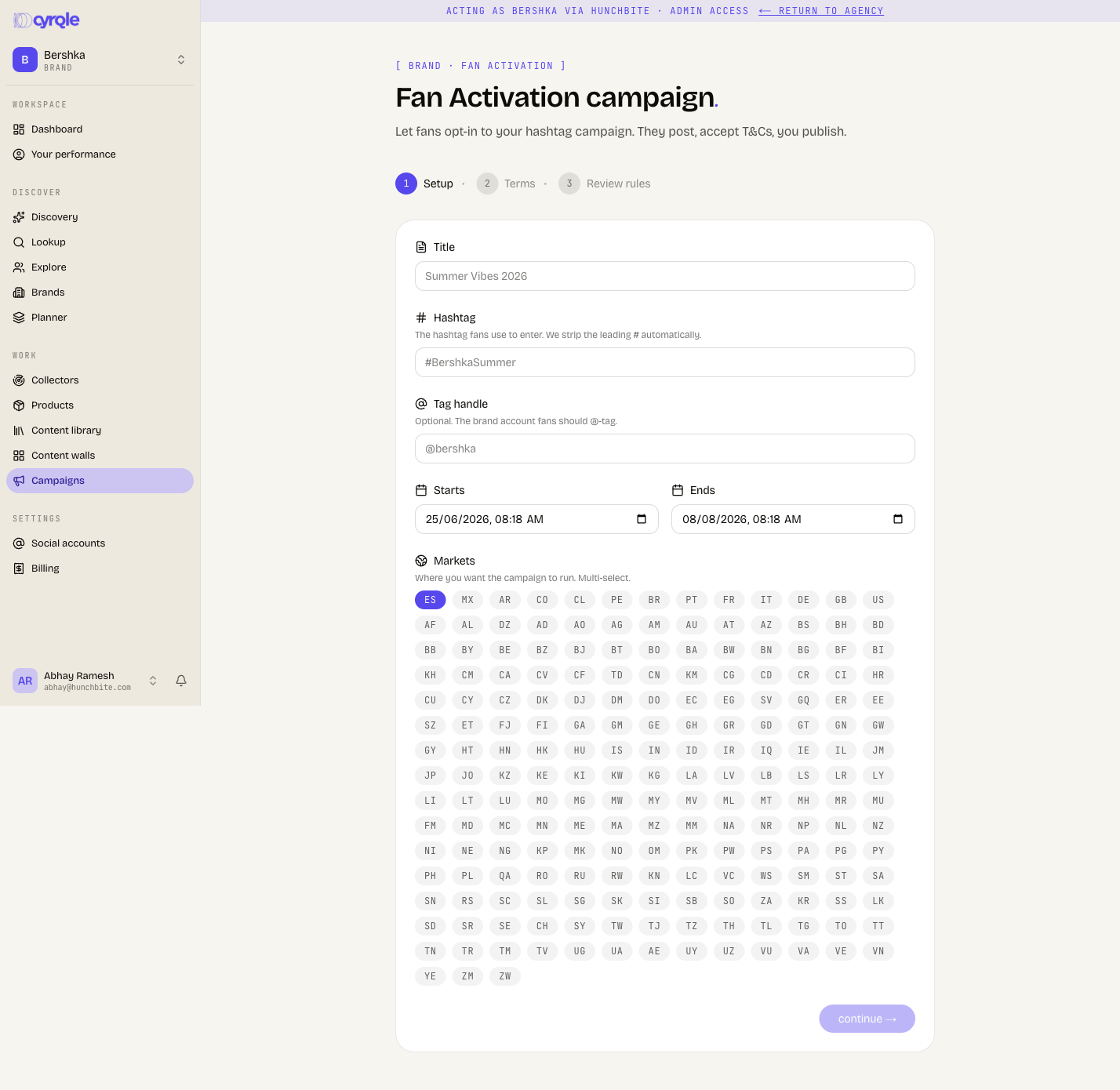
Go to Campaigns and click Fan Activation, then create a new activation.
Fill in the setup step
Enter a Title and the Hashtag fans use to enter. Cyrqle removes the leading hash. Add an optional Tag handle for the account fans should tag. Set Starts, Ends and Markets.
Choose the terms
Pick the Cyrqle template, or paste your own terms. Custom terms must be at least 200 characters. Cyrqle warns when your text has no rights grant, no attribution clause or no age clause. It offers to insert a standard clause. A GDPR clause is added and locked on for European markets.
Accept the terms
Tick the confirmation box. Any edit that changes the rendered text clears the box and you must tick it again.
Choose how entries are reviewed
Manual review holds each entry in a queue until your team approves it. Auto-approve publishes an entry as soon as Cyrqle detects the hashtag and the terms acceptance. Auto-approved entries cannot be taken back off social. Set how many top entries by engagement are featured.
Start the campaign
The final button creates and publishes the activation in one move.
Everything is frozen after you publish
The hashtag, dates, markets, review mode, feature count, theme, accent and terms can only be changed while the campaign is a draft. After publishing, the controls still appear and fail to save. Check every field before the last step.
Run the activation
The detail page has four tabs: Overview, Entries, Landing page and T&Cs, plus a strip counting entries, approved, pending and rejected. The public landing address has a copy button next to it.
Cyrqle collects entries when you publish, and then about every six hours. It is not a live feed. A busy hashtag can also exceed the 200 posts collected per run.
Review entries
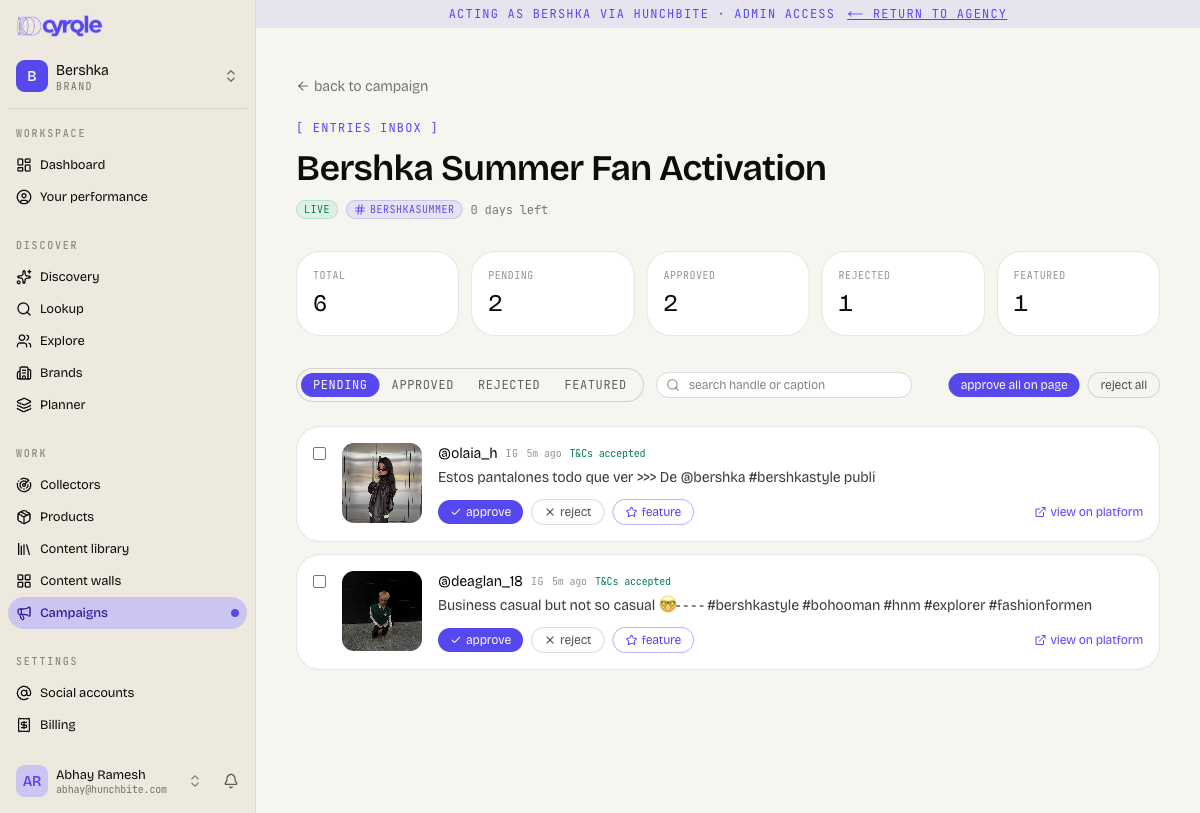
Open the entries inbox
Filter by pending, approved, rejected or featured.
Approve, reject or feature each entry
The row actions appear only while an entry is pending.
Feature the entries you want to show
Featured entries are the pool you pick winners from.
Approving an entry cannot be undone
- Approval writes a permanent permission to use that fan's content. The row actions disappear once an entry leaves pending, so there is no un-approve in the product.
- approve all on page and reject all act on every entry listed on the page, not on the rows you ticked. Approve-all asks for no confirmation. Use the per-row actions when you are being selective.
- Cyrqle does not verify entries. It does not check that the caption contains your hashtag, that your account was tagged, or that the post falls inside your campaign window. Read each entry before you approve it.
Pick winners
Click pick winners on the detail page. Mark the winners and save. Winners are drawn from featured entries, so feature entries in the inbox first.
pick winners appears only after the end date has passed. Until then the button is absent.
Contact your winners yourself
Cyrqle sends no email at any point in a fan activation. Winner notices are in-app only, and a fan who entered from a public hashtag has no Cyrqle account, so in practice nobody is notified. Reach out through the social account the fan entered from, as your terms promise.
Close the activation
close campaign hides the activation, it does not stop it
close campaign removes the activation from your list and leaves it running. Its status stays live. Collection keeps running every six hours and keeps spending your credits. The landing page stays public, and pick winners never appears. The only thing that really closes an activation today is the end date passing. Set an end date you are happy with, and wait for it before you pick winners.
Once the end date has passed you can archive the activation. Archiving stops the listener permanently, freezes the winners, and keeps the page readable.
Rights granted under fan activation terms are perpetual. Approved entries can be used on any wall, in any market, for as long as you want.
Pitfalls
- The landing preview shows a not-found page while the campaign is a draft. The public page does not exist until you publish. The preview frame on the detail page is therefore empty at the point you want to check it. Publish, then open the public address.
- The market filter in the entries inbox always returns nothing. Cyrqle does not record a market on an entry. Use the search box instead.
- There is no export. Entries and winners cannot be downloaded today.
- Prizes cannot be entered anywhere in the product, so no prize appears on the public page. Describe the prize in your terms text.
- Entries can show zero with no error. If the entries list stays empty for more than a day after publishing, contact Cyrqle support rather than relaunching the listener: every relaunch is a billed collection run.