Outreach and contracts
Run the conversation, agree the deal, set paid-ads rights on the offer, and get the agreement signed.
The Outreach tab has three panes: the thread list on the left, the conversation in the middle, and the deal terms on the right. The paid-ads rights freeze when you send the agreement, not when it is signed.
Before you start
- Compensation must be complete on the Brief tab, or every invite is refused. See Creators and invites.
- An editor can invite, negotiate and mark a deal agreed. Only an admin can send an agreement for signature or link brand terms.
- Decide now whether you will ever boost this content as a paid ad. Read the next section before you send a single offer.
Set paid-ads rights on the offer
Every signed agreement grants content-wall and campaign use. Paid social is separate, and it is off unless you tick it.
Tick the paid-ads box before you send the offer
On the offer, under Content usage rights, the first row is always granted and you cannot untick it. The second row, Paid ads, is off by default. Cyrqle freezes the rights into the agreement when you send the agreement. A later change to the campaign default does not widen an agreement already out. Without paid-ads rights, no post in the campaign can be boosted and the Boost button never appears.
Open the offer for the creator
Use the invite drawer, or the current offer in the deal pane.
Find Content usage rights
The first row reads that content wall and campaign use are always granted on a signed contract.
Tick Paid ads
The row licenses the signed creator's content for boosting and paid social.
Send the offer
The rights are now frozen into whatever agreement follows.
You can also tick paid ads once in the compensation card on the Brief tab. That only seeds new invites. What binds is the box on the offer you send.
If you already sent the offer without it
You cannot widen a signed agreement. Two routes remain:
- Re-contract the creator on a new offer with the box ticked.
- Ask an admin to click Grant new rights in the creator drawer and pick the Paid ads purpose. This works only after the creator has delivered a post into the campaign. Before that, Cyrqle refuses because there is nothing to grant rights over.
Rights granted through the public rights-request page do not clear the boost gate. Only rights attached to this campaign do.
Run the conversation
The thread list shows every creator with an application. Click a creator to load the conversation and the deal terms.
Toolbar actions are Bulk invite, Share link, Manage templates and Log offline contact.
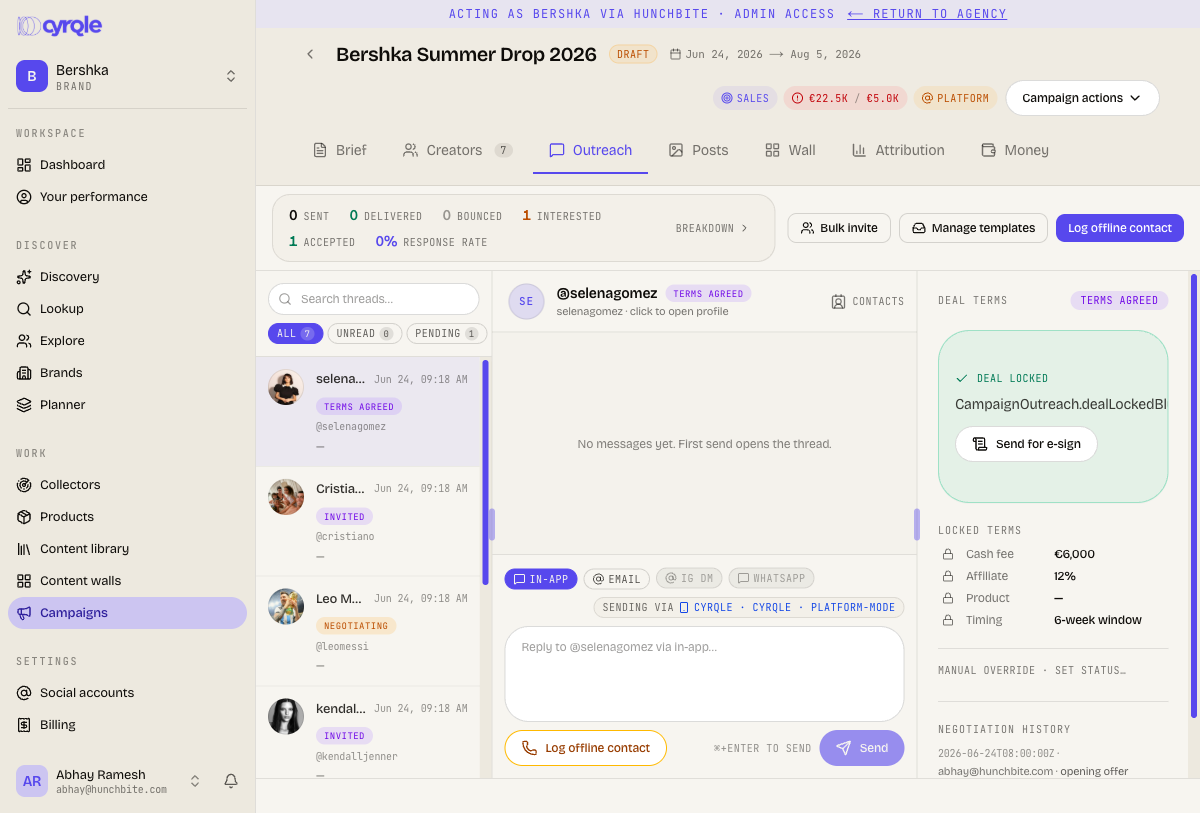
- An email that cannot be sent falls back to an in-app message. The only sign is a short message saying there is no email on file, or that the creator opted out.
- Each campaign holds its own thread with a creator. Invite the same creator into another campaign and you get a new, empty thread.
Negotiate the deal
The deal pane holds the cash fee, affiliate percentage, product, fulfilment contact, timeline, rights and the paid-ads flag. A deal moves through not started, negotiating, counter proposed, awaiting signature, and then agreed or declined.
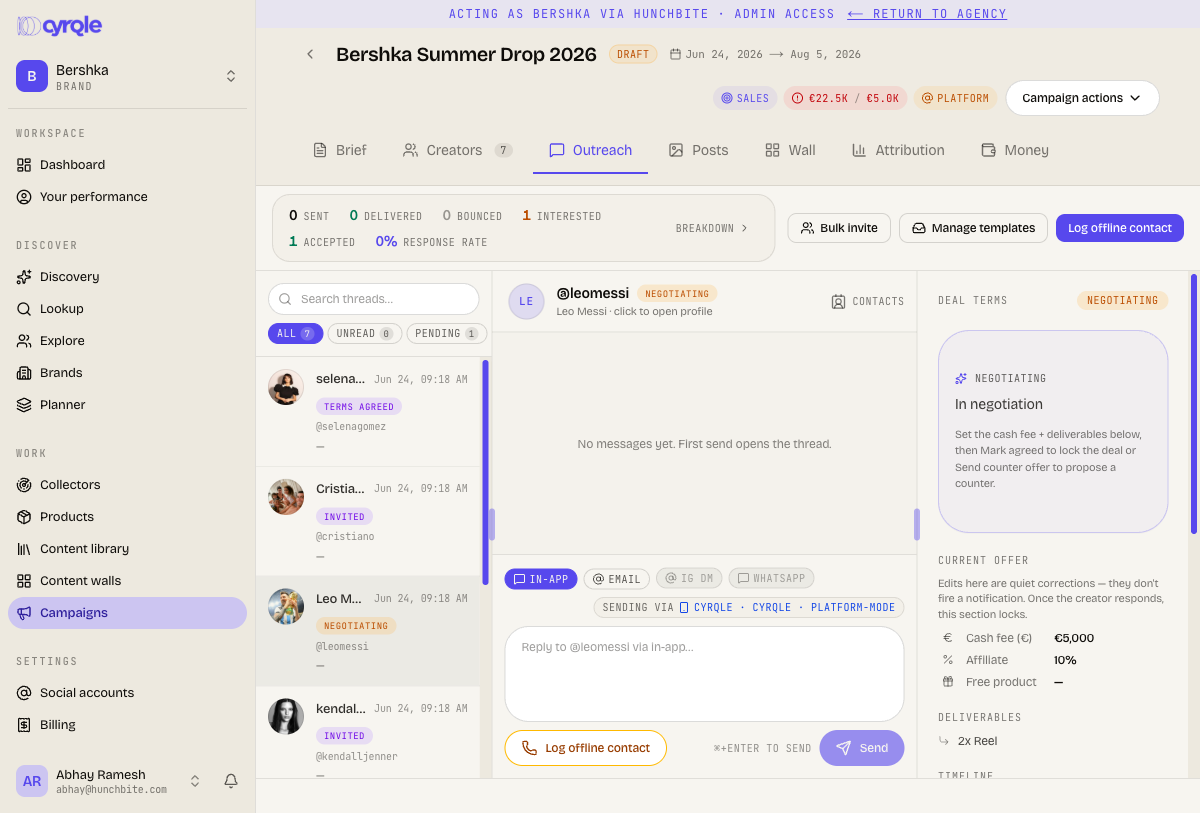
Edits to your current offer before the creator responds are quiet corrections. They send no notification. Once the creator responds, the section locks.
Guardrails warn, they never block
Cyrqle warns when an offer is over budget, under your minimum, over your maximum, or empty of compensation. Every one of these is advisory. The offer still sends.
Send the agreement
Agree the terms
Both sides settle the numbers in the deal pane.
Click Send for e-sign
An admin clicks it. Cyrqle builds the agreement from the terms on record and emails the creator a signing link.
Wait for the signature
The creator reads the locked terms and ticks the confirmation box. The creator ticks your brand terms box when you linked one, then types their full name.
Check the creator is under contract
A full signature moves the creator to under contract, grants the content rights the agreement froze, and emails both sides. Production can start.
Renegotiating kills the outstanding signing link
- Changing the terms after you sent the agreement cancels it and the creator's link stops working. Send a new agreement. Cancelling an agreement also kills the link permanently.
- An agreement expires after ninety days. Cyrqle nudges the creator after three days and again after seven, and cancels the agreement automatically after fourteen days if it is still unsigned.
Pitfalls
- An agreement can fail to be created with no message. When a creator accepts, Cyrqle tries to build the agreement automatically. If your workspace has no usable terms template, or the deal has no compensation at all, nothing is created and nobody is told. Check the creator reached under contract before you let production start.
- Marking an agreement signed by hand cannot be undone. Recording a signature outside Cyrqle is a full completion. It moves the creator to under contract, grants the rights, and emails both sides. There is no undo, and the agreement can no longer be cancelled. It needs a reason note and the channel you used.
- Send for e-sign is stricter than Cyrqle itself. It stays disabled when the agreed cash rate is zero, even though affiliate-only and product-only deals are valid. Put a cash rate on the deal to release the button.
- In the deal pane, Create initial offer, Use template, Apply campaign default and Park are disabled. Cyrqle creates the offer when you invite the creator, so the offer you send is always the offer on record.