Money
Fund the campaign wallet, schedule and send payouts, record offline wires, and download receipts and statements.
Each campaign has its own wallet. You fund it, then pay creators from it. A payout moves the creator's net amount to their connected account.
Before you start
- Every money action needs admin access. An editor can run the whole campaign and cannot fund it or pay anyone.
- The creator needs a connected payout account and completed identity checks before Cyrqle can transfer to them. Coverage is Europe and the United States. Everywhere else you pay by bank transfer and record it here.
- The campaign needs an agreed rate on the creator, or Cyrqle has nothing to schedule.
Fund the campaign
Money enters the wallet once, and it leaves only as a payout or a refund.
Click Fund campaign
The dialog Fund this campaign opens.
Enter an amount
The minimum is 1.00 euro. Cyrqle refuses less with Enter at least €1.00.
Pay on the hosted checkout page
The wallet balance updates when the payment settles.
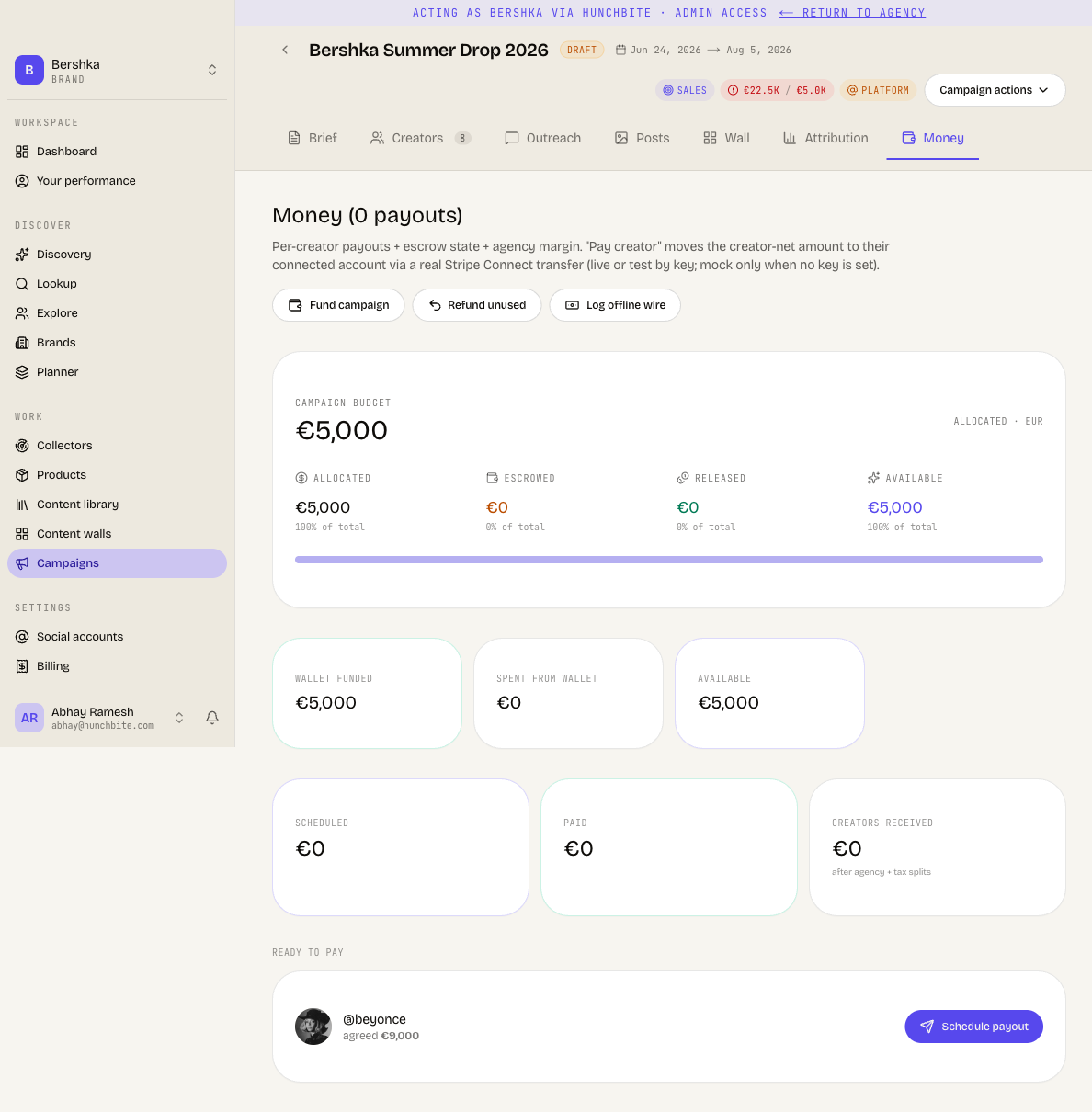
The budget card shows four cells that reconcile: Funded minus Scheduled minus Paid equals Available.
| Cell | What it means |
|---|---|
| Funded | Money paid into the wallet. Sub-label: in wallet. |
| Scheduled | Payouts queued but not yet sent. Sub-label: queued. |
| Paid | Money already sent to creators. Sub-label: to creators. |
| Available | What is left to spend. Sub-label: to spend. |
When the campaign is over budget, the Available cell turns amber and a banner reads that you can still schedule payouts.
Pay a creator
Creators appear under Ready to pay once they are in production, delivered or completed. Settled runs move to History.
A payout cannot exceed the funded wallet
Cyrqle refuses a payment that the wallet cannot cover and tells you how much to add. The obligation stays payable and is not marked failed. Cyrqle checks the gross amount, not the creator's net. A wallet funded to exactly the creator net is therefore still short.
Open the creator's payout row
Cyrqle schedules a payout automatically when a creator is delivered and has an agreed rate or accrued commission.
Check the payout account badge
It reads that the creator is ready, that setup is unfinished, or that there is no account. Without a ready account, pay by bank transfer and record it.
Send the payment
Confirm the amount. Cyrqle transfers the creator's net amount and records the commission, any agency fee and any tax against the payout.
Handle an instalment
Paying part of an amount keeps the remainder scheduled and payable, unless you mark the payment as final.
Record money that moved outside Cyrqle
Log offline wire and Mark paid externally are not the same
Log offline wire creates a brand-new paid record. Mark paid externally settles the payout that already exists. Using the wrong one books the same obligation twice, and there is no duplicate check. Use Mark paid externally on a payout that is already on the list.
Refund what you did not use
Refund unused pays out immediately with no confirmation
One click sends the refund. There is no confirmation dialog and no undo.
Documents
- A receipt is available on a paid payout. The payee is the creator's verified legal name and the issuer is the Cyrqle legal entity.
- A statement covers the whole engagement with a creator: what was agreed, every payment and its reference, anything written off, and what is outstanding.
Pitfalls
- Going over budget does not stop a payout. Cyrqle warns that the campaign is over budget and still schedules the payout. The banner is the only guard.
- Cancelling or voiding a payout needs no admin rights. Every other money action requires an admin, but any workspace member can cancel or void a scheduled payout and remove the obligation. Watch who has access.
- Closing a balance writes off money a creator is owed. It needs a reason note and is recorded only in the audit trail. Use it deliberately.
- Payout readiness is read from Cyrqle's last sync with the payment provider, not live. A ready badge can be stale for a few minutes after the creator finishes setup.
- Amounts are shown in euros throughout the campaign screens, whatever your workspace currency.