Creator profile
Read a creator's quick-look drawer and full profile, understand where the numbers come from, and refresh the data when it is stale.
Before you start
- Cyrqle holds a record for every creator in the index. You read it in a quick-look drawer that opens from any result card, and on the full profile page at the creator's handle.
- Creator data is historical, not live. Cyrqle scraped it on the date shown at the bottom of the drawer.
- Refreshing a creator and pulling more posts both spend credits.
- Contact details appear on the full profile only, never in the drawer.
Steps
Open the quick-look drawer
Click any creator card in Find creators, in a list, or in a campaign. The drawer slides in from the right.
It shows, in order:
- Avatar, name, platform badge, and an on Cyrqle pill when the creator has claimed the profile.
- Followers, posts and engagement.
- Why this creator matched, inside a campaign only.
- The bio.
- The engagement profile: median engagement rate, weighted engagement rate, average likes, average comments and freshness.
- Post types, as a content mix.
- The sector nest, with the hashtags, mentions and brands that evidence each sector.
- Content categories from the creator's images.
- The latest 6 posts, with a paid-partnership badge where one applies.
- Brand collaborations.
- The accounts the creator tags most, as an extra collaboration signal.
- Deal and fee visibility, inside a campaign only.
- Look-alike creators.
- The footer: refresh, pull more posts, open full profile, save to a list, and the date Cyrqle last updated the record.
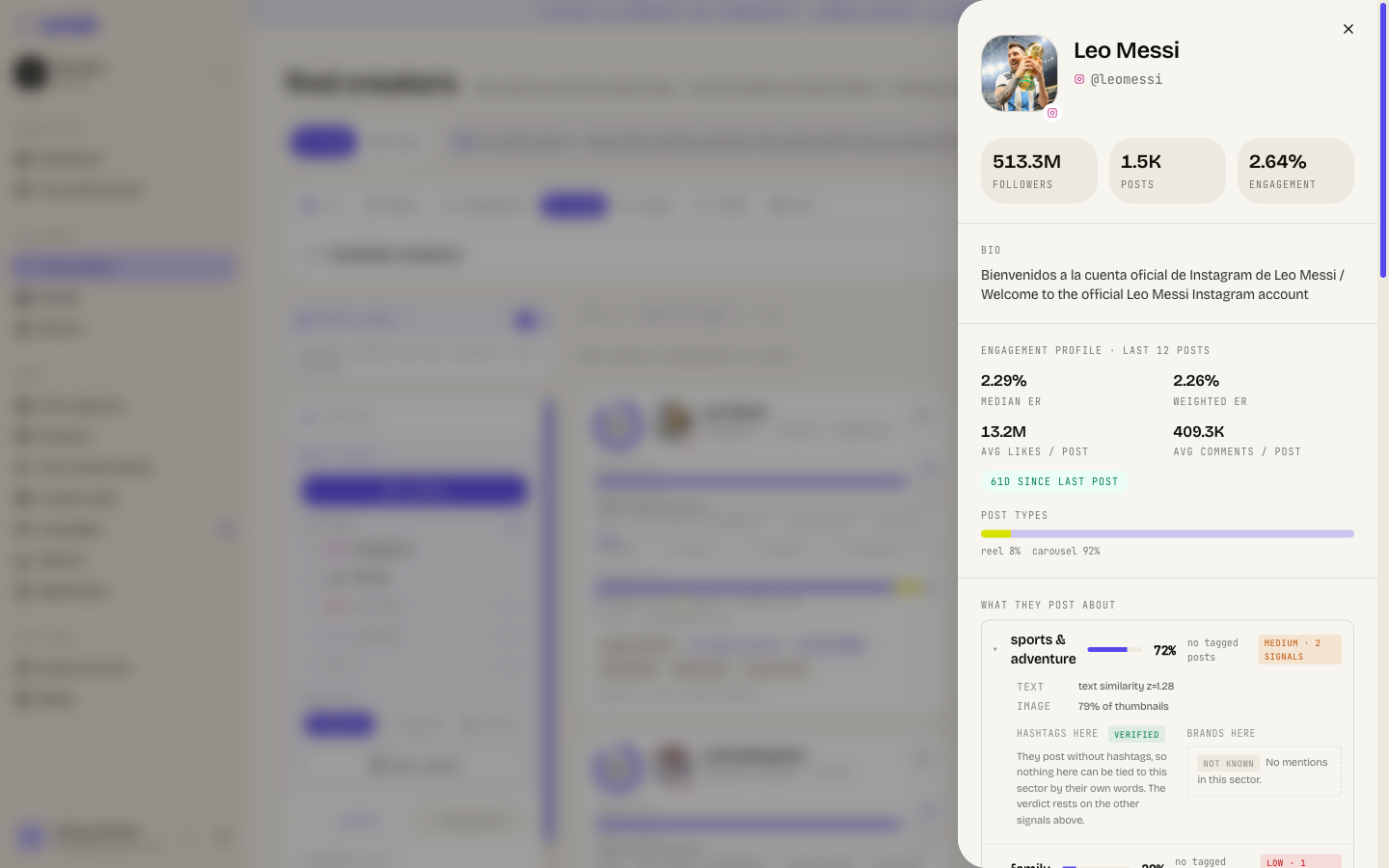
The engagement profile is calculated over every post Cyrqle holds, but the drawer shows only 6 of them. The numbers and the post grid do not match, by design.
Open the full profile
Click open full profile in the drawer, or click a handle in the Exact matches dropdown on Find creators.
The full profile adds bio links, posting cadence, the sector nest with evidence chips, the contacts strip and the refresh actions. It also adds a paginated post grid with load more, brand collaborations, top tagged accounts and related profiles.
- A bare handle resolves across platforms. Cyrqle prefers Instagram, then the account with the most followers. The same handle on TikTok may not be the record you land on. Open the creator from a result card to be sure.
- A handle Cyrqle does not hold opens a "not in index" page, not an error page. That page offers to fetch the profile from the network.
Refresh a creator
Refresh creator pulls live data and spends credits. Check the cost and your balance on the confirmation card before you continue.
Start the refresh
Click Refresh creator in the drawer footer or on the profile page.
Read the confirmation card
The card shows cost in credits and your balance. An agency-covered workspace reads unlimited.
Confirm
Click Refresh.
A refresh re-reads the profile and the newest 12 posts. Cyrqle reports the posts and the credits it used when the run finishes.
Cyrqle blocks a repeat refresh inside a short cooldown window and tells you the data is still fresh. Click Refresh anyway to override it.
Pull older posts
Pull more posts reaches further back than a refresh. Set how far back between 12 and 200 posts. The default is 50. The cost rises with the depth you pick.
Cyrqle shows post coverage above the control: which windows it holds and where the gaps are. Click fill this gap to target a missing window instead of pulling from the newest post.
Instagram has no date filter. A pull on Instagram always reaches deeper from the newest post, so a gap in the middle costs more to fill.
How credits work here
Credits meter the live data Cyrqle pulls for you.
- A refresh is the profile plus the newest 12 posts.
- A pull is priced by the depth you choose.
- A handle lookup against the index is free. Only a live pull costs credits.
- Credits are a meter today, not a wall. Cyrqle records every spend and shows it on the confirmation card, but it does not block a run when your balance is low. Watch the balance yourself.
- A fetched profile is shared. The creator index is one global index, so a profile your workspace pays to pull is then available to every workspace. Nothing you import is private to you.
Pitfalls
- There is no contact information in the drawer. Email and phone live on the full profile and in a campaign's outreach tab.
- Audience demographics are not shown anywhere on the creator profile or the drawer. Age, gender and country of a creator's followers are not available to you today.
- find similar on the full profile almost always returns nothing. It reads a related- profiles field that is empty for every creator. Use the look-alike section in the drawer instead, which works.
- A dash on a tile means the sample was too thin to publish a number. It does not mean zero.
- Adding a brand as a positive or negative seed from the drawer is coming soon. The buttons are visible but do nothing.
- A deleted or missing creator opens an empty record, not an error.
Reference
| Limit | Value |
|---|---|
| Posts shown in the drawer | 6 |
| Posts a refresh pulls | 12 |
| Pull depth | 12 to 200 posts, default 50 |
| Top tagged accounts | 12 |
| Handle format | letters, digits, dots and underscores, up to 80 characters |
| Platforms that can be fetched | Instagram, TikTok |
Lists
Save creators into a list, import a batch of handles, compare lists side by side, model a budget, invite creators to Cyrqle, and push a list into a campaign.
Brand catalogue
Browse the shared brand database, add a brand, attach its social accounts, and read what a brand posts and who posts about it.