Find creators
One search over the whole creator index. Set a goal, describe who you need, filter, rank, and save people into a list.
Every result card can be saved into a list. The page has two tabs: Find and Lists. A brief bar sits under the tabs on both tabs.
Before you start
- Find creators is available to brand and agency workspaces only. Creator workspaces do not see it.
- Instagram and TikTok are indexed today. YouTube, LinkedIn and X show Soon and cannot be searched.
- Creator data in the index is historical, not live. Cyrqle refreshes a creator when you ask it to. See Creator profile.
- Some actions on this page pull live data and spend credits. Each one is marked below.
Steps
Only two tabs exist
Find and Lists are the only tabs. There is no separate Discovery, Explore or Lookup page, no Creators or Posts toggle, and no hashtag search anywhere in Cyrqle. Older links to /discovery, /explore and /planner return a page-not-found error.
Run a search
Pick a goal
Click one chip under goal: Reach, Engagement, Sales, Leads, Traffic or UGC.
Describe who you need
Type into the search box. Describe the creator, or paste one @handle.
Submit the search
Click Recommend. The button reads Match when no goal is set, and Search when AI is off.
Narrow the results
Use the filter rail on the left. See Filters below.
Rank the results
Open rank by and pick a lens. Cyrqle re-sorts the results you already have.
Save the people you want
Click Add to list on a card. To save the whole page of results, click Add all to list….
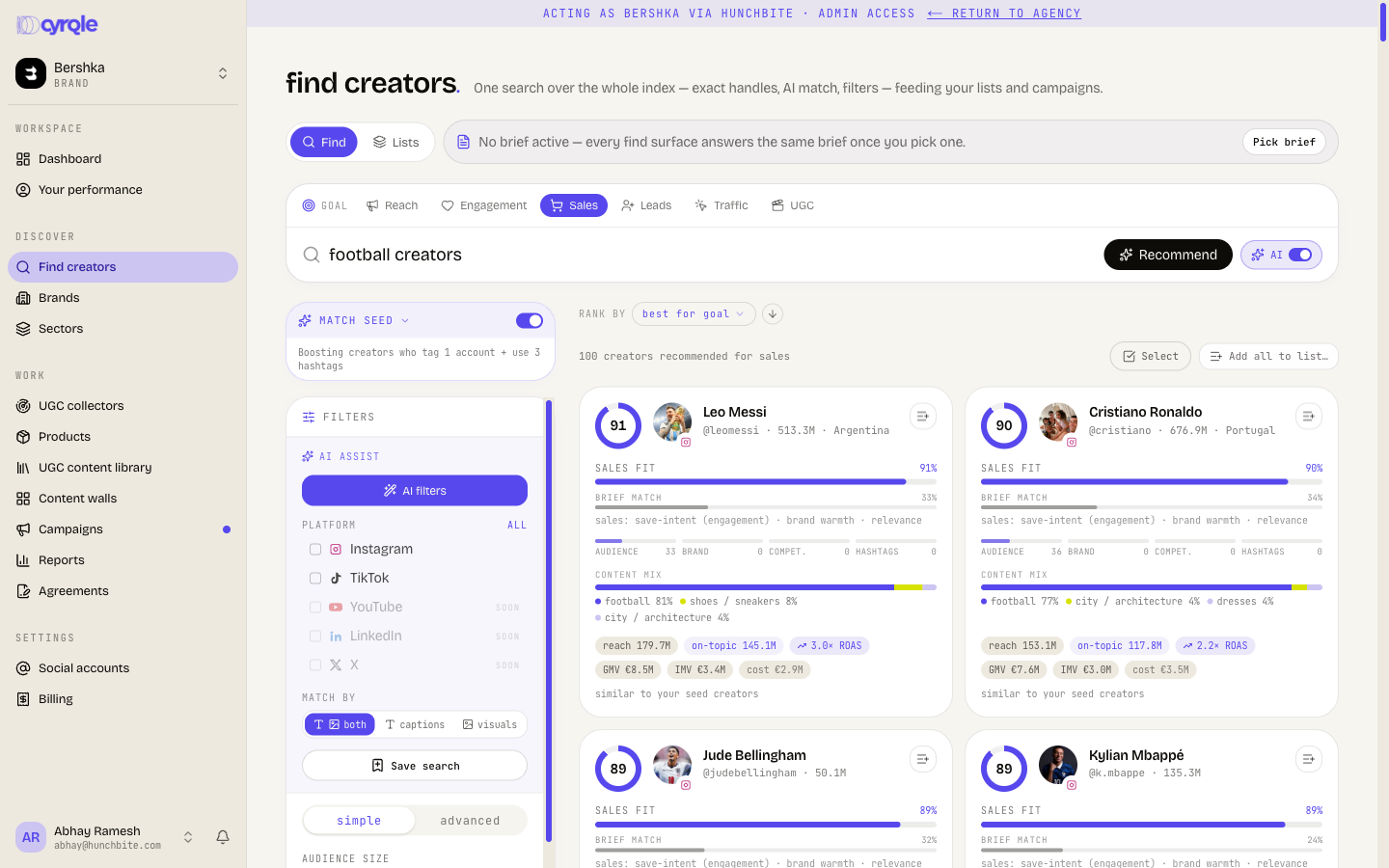
What the AI switch changes
The AI switch sits next to the search box.
- AI on, goal set. Cyrqle ranks the index against your description and your goal. Each card shows a fit score and the estimate chips.
- AI on, no goal. Cyrqle runs a plain meaning match on your description.
- AI off. Cyrqle runs a plain keyword search over creator names and handles. The goal chips stop working and dim.
A goal on its own returns nothing new. Cyrqle only builds recommendations when the search box holds text. With a goal and an empty box you get the plain browse grid.
Look up one creator by handle
Type two or more characters. Cyrqle shows an Exact matches dropdown with up to 5 handles. Click one to open that creator's profile. This read is free and never pulls live data.
Pasting a profile URL for a creator Cyrqle does not hold fails silently. The spinner stops and nothing happens: no message, no error. Press Enter instead to run the search, then use fetch from Instagram or fetch from TikTok in the empty state.
Filters
The filter rail is the only filter surface. It has a Simple tab and an Advanced tab.
Simple tab
Each group is single-pick and applies at once.
| Group | Options |
|---|---|
| Audience size | Any, under 10K, 10K to 100K, 100K to 1M, 1M and above |
| Engagement rate | Any, under 1%, 1 to 3%, 3 to 8%, 8% and above |
| Last active | Any, last 7 days, last 30 days, last 90 days, last year |
| Market | Searchable country list with live counts |
| Sector | Sector list, plus a sector strength control |
| Kind | Any, Verified, Business, Reels-heavy, Carousels-heavy |
| Contact | Has email, Has phone, On Cyrqle (combined with AND) |
Sector strength narrows hard. 40%+ and 60%+ also require 4 or more posts in that sector. On a thinly classified sector this can drop the result count to zero.
Advanced tab
The Advanced tab is a rule builder. Rules combine with AND only.
The fields are AI match, Similar to creator, Similar to list, Worked with brand and Audience size. There are also Engagement rate, Market, Sector, Last active, Verified, Business account, Platform and Search.
There is no bio field and no hashtag field, even though the footnote in the product mentions them. The Search field matches a handle, a name and a bio together.
Platform
Instagram and TikTok are live. YouTube, LinkedIn and X are shown but disabled, marked Soon.
AI filters
Click AI filters to turn your description into filter rules. Type 3 or more characters first, or Cyrqle asks you to type what you are looking for.
The ranking vocabulary
A recommendation card carries a fit score, four dimension bars, and a row of value chips. Hover the fit score to open the full breakdown.
Every number on a card with "est." in front of it is an estimate, not a quote. Cyrqle calculates it from public post data and a set of shared assumptions. It is a way to compare creators against each other, not a price or a forecast.
The value chips
| Chip | Plain meaning |
|---|---|
| reach | Estimated impressions. Followers multiplied by an assumed reach rate of 0.35, multiplied by the number of deliverables on your brief. Cyrqle uses real observed views instead of followers when it holds enough of them. |
| on-topic | The share of that reach that sits inside the subject of your search. It appears only when it is lower than reach. |
| cost | Estimated market rate for one creator. Cyrqle derives it from the follower tier, scaled by engagement, with a floor of 50 euros so small creators are not estimated at near zero. It is a ballpark, not a quote, and it ignores the cash range on your brief. |
| GMV | Estimated sales value. The creator's engaged interactions per post, multiplied by the number of deliverables, multiplied by an assumed conversion rate of 1%, multiplied by an assumed average order value of 45 euros. |
| IMV | Impact media value. The engaged interactions on a post, multiplied by the number of deliverables, multiplied by 0.25 euros. IMV is deliberately small for a post with low engagement. |
| ROAS | Estimated return on spend. Estimated GMV divided by estimated cost. |
The conversion rate, the order value and the reach rate are shared assumptions. Cyrqle staff can tune them. They are not measured for your brand until real sales attribution accrues.
The four dimension bars
| Bar | Plain meaning |
|---|---|
| audience | How closely the creator's audience size and engagement match what your goal needs. |
| brand | Brand affinity. How warm the creator already is to your brand: they tag your accounts, use your hashtags, or have worked with you. |
| compet. | How much the creator overlaps with brands next to yours. |
| hashtags | How much the creator's own hashtags agree with your search. |
brief match is one score from 0 to 100 for how well the creator answers your description. It combines meaning match, topic, geography, hashtags and engagement, plus the brand and seed boosts.
content mix shows the proportion of subjects in the creator's images.
The sort labels
Open rank by to pick a lens. Cyrqle re-sorts the results already on screen. It does not run a new search.
| Label | Plain meaning |
|---|---|
| best for goal | Ranks on the measure your goal cares about. Sales leans on save intent, leads on comments, reach on impressions. Scores are relative to the creators shown. |
| best match | The brief match score, highest first. |
| best value | Efficiency. 60% engaged reach per euro, 40% ROAS, measured against the best creator shown. |
| most trusted | Authority. Audience size, the verified badge, and how many brands already want this creator. |
| hidden gems | Undervalued creators: strong fan intensity, good efficiency, and few brand deals so far. |
| brand fans | Creators already warm to your brand: brand affinity, demand from other brands, and prestige. |
| community | Comment depth. Comments divided by likes plus comments. |
| viral upside | Spike size. The creator's 90th-percentile post interactions divided by their median post. |
Below the divider you can also sort on one raw number: roas, est reach, On-topic reach, est gmv, imv, followers or engagement.
Match seed
Match seed sits above the filter rail. It boosts creators who already tag your brand accounts or use your brand hashtags.
- Seeds come from the social accounts linked to your workspace, up to 6 accounts and 12 hashtags.
- With no account connected, Cyrqle shows that results are not seeded and offers Connect one.
- reference creators adds look-alike seeds. Cyrqle suggests creators who have already worked with your brand.
- other brands adds brands next to yours. A brand with no social handle cannot be matched on posts.
Search the web for more creators
The from the web section sits below the recommendations. It asks an AI to find creators that are not in the Cyrqle index yet.
Set a target
Pick find up to 25, 50 or 100.
Run the sweep
Click Search the web for more creators. Proposing candidates costs no credits and writes nothing to the index.
Index the ones you want
Click index all. Cyrqle fetches each profile from the network in batches of 12.
index all is the only action on this page that spends real money on live data pulls. The cost shown next to the button is an estimate. Read the candidate list before you click.
Card states are searchable, indexed, not searchable yet, fetching profile, not found and failed.
Save a search as a brief
A brief is a saved search. It lives in your workspace and appears in the brief bar on both tabs.
Save the current filters
Click Save search in the filter rail.
Name it
Enter a name and click Save.
To build one from scratch, click Pick brief, then New quick brief. Enter a title of 2 characters or more, pick an objective, set a market, and describe what you are looking for. Click Create.
What applying a brief does
- Applying a brief injects its filter rules only. The objective, the market and the budget on the brief do not change the ranking. Click the goal chip yourself after you pick a brief.
- The brief picker lists every brief in the workspace, campaign briefs included, newest first, capped at 50. Older saved searches drop off the list on a busy workspace.
- You can create and duplicate a brief from the brief bar. You cannot rename or delete one there.
Pitfalls
- An advanced rule silently replaces the matching simple filter. The simple group greys out and reads set via advanced rule, which is easy to miss.
- An AI match, Similar to creator, Similar to list or Worked with brand rule that finds nothing returns an empty grid with no explanation.
- Add all to list… fails above 200 results. Cyrqle can hold up to 300 recommendations on screen, but a single save accepts 200 creators. Above that you get a generic save error. Save in two passes, or narrow the results first.
- A country name in your search text narrows the market on its own. "creators in Spain" and "spanish chefs" both set the market to Spain, even though no country filter is showing.
- A free-text search shows no result count. The header reads "search results" with no number. Counting every match takes about half a minute, so Cyrqle skips it.
- A newly fetched creator is in the index but is not searchable until Cyrqle scores and classifies the profile. Small imports wait for the next scoring cycle.
- Has email on this page means Cyrqle holds a public email or a contact record. It does not count the login email of a creator who signed up on Cyrqle. The invite dialog in Lists counts that one, so the two numbers can differ.
- The captions, visuals and both lens applies to AI search only. It does nothing when AI is off.
Reference
| Limit | Value |
|---|---|
| Typeahead suggestions | 5 |
| Browse results per page | 30 |
| Recommendations on screen | 300 (grows 100 at a time) |
| Creators per save to a list | 200 |
| Web sweep target | 25, 50 or 100 |
| Web sweep index batch | 12 profiles |
| Briefs in the picker | 50 |