Competitor research
Browse the brands directory to study competitors, benchmark their content, and find the creators they already work with.
The Brands directory is Cyrqle's competitor-research workspace. It is a searchable catalogue of brand accounts that Cyrqle tracks across Instagram and TikTok, with live profile and engagement data. Use it to look up a competitor, see how active they are, study the content they post, and discover the creators who tag and collaborate with them.
This page is about researching other brands, not managing your own agency clients. It only shows brand accounts. To search individual creators, use Discovery (the /explore directory) instead.
Open the directory
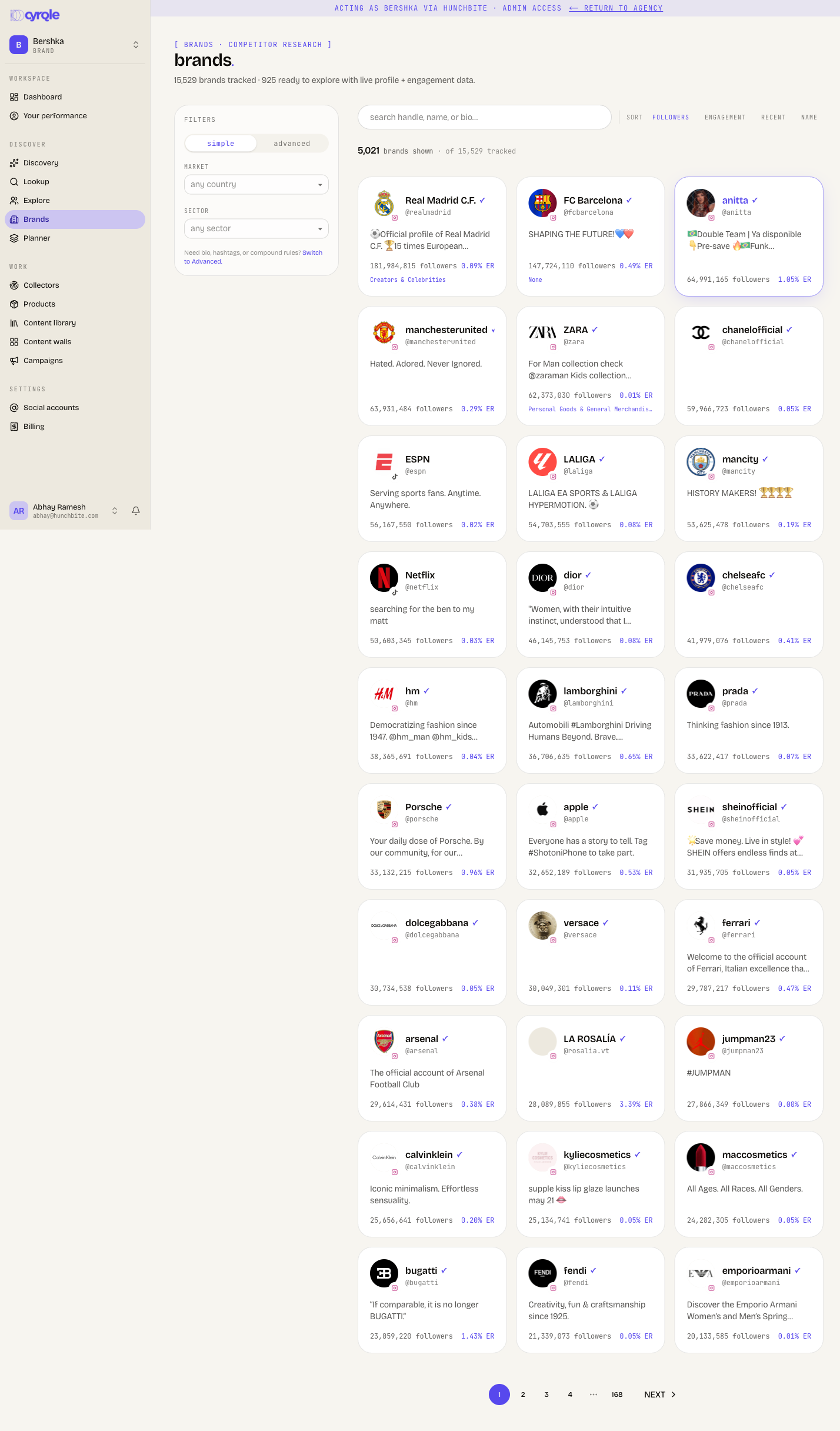
From your workspace, go to Brands. The header tells you the size of the catalogue, for example "12,000 brands tracked · 4,300 ready to explore with live profile + engagement data." The first number is every brand Cyrqle knows about; the second is the subset that has a live social profile you can open and explore in full.
Find a brand
Type into the search box labelled search handle, name, or bio…. Results filter as you type (no submit button) and match on the brand's handle, display name, and bio text. When a search is active it appears as a removable q: chip above the results; clear it with the ×.
To narrow without searching, use the filter rail on the left. In Simple mode brands expose two facets:
- Market — the brand's country.
- Sector — the brand's business category (for example, beauty, fashion, food).
Each option shows a count so you can see how many brands fall under it. Switch the rail to Advanced for the rule builder if you need to filter on fields beyond Market and Sector.
Sort the grid with the sort control on the right:
- followers — largest audience first (the default).
- engagement — highest engagement rate first.
- recent — most recently refreshed first.
- name — alphabetical.
Results are paginated at 30 brands per page. The count line ("420 brands shown · of 12,000 tracked") confirms how many match your current filters.
Read a brand card
Each card in the grid summarises one brand at a glance:
- Profile picture with a small badge for the platform (Instagram or TikTok).
- Display name, a
✓if the account is verified, and the@handle. - A two-line bio excerpt.
- Followers count and, when available, the ER (engagement rate) percentage.
- The brand's sector (business category).
Click any card to open the full brand profile.
Read a brand profile
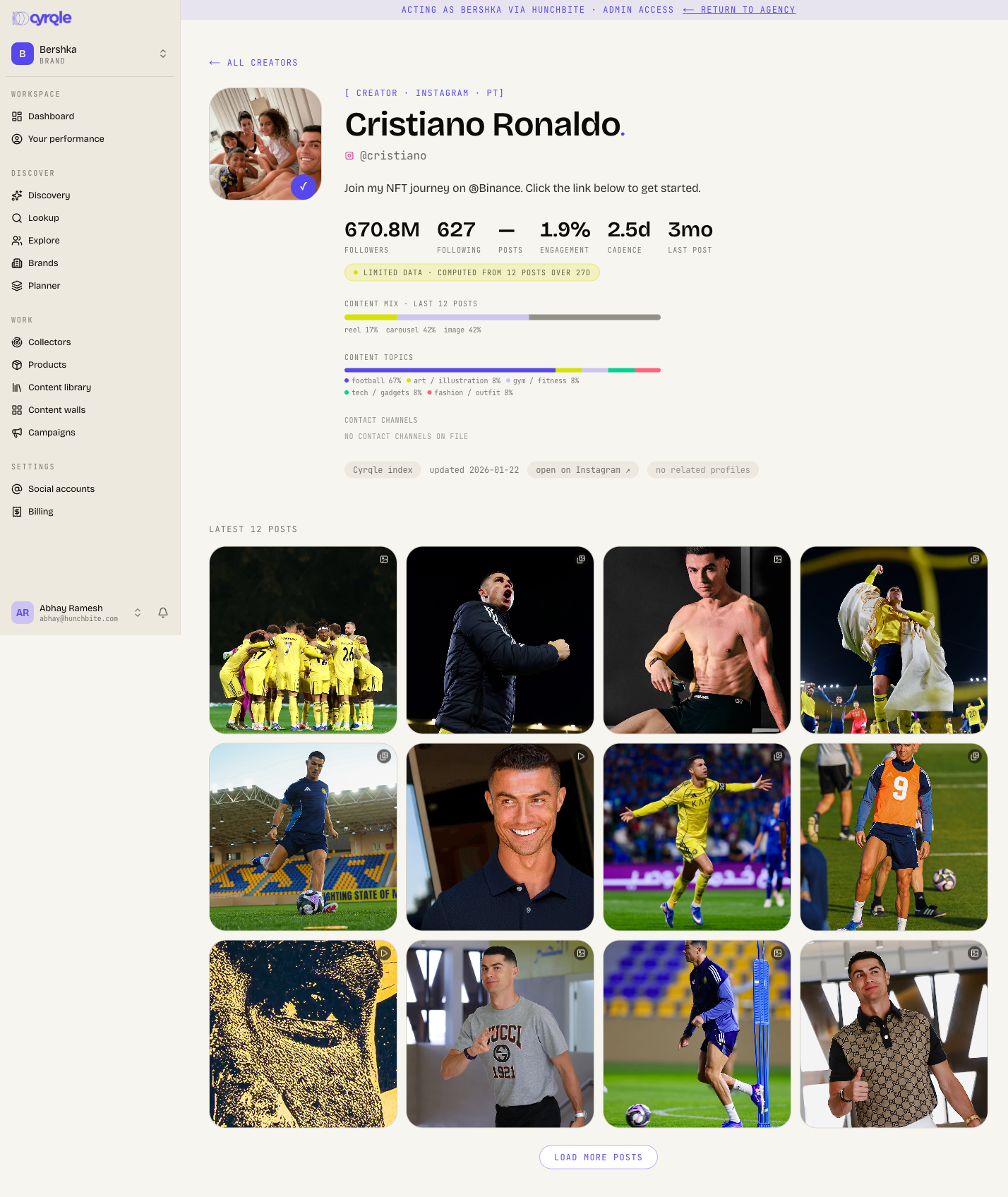
The profile page is the heart of competitor research. It opens with a hero block showing the brand's avatar, name, platform, country, sector, bio, and any bio links (shop, link-in-bio, music). A row of headline numbers gives you followers, following, posts, engagement, cadence (average days between posts), and last post (how long ago they last posted).
If Cyrqle computed some numbers from a small sample, a "limited data" badge appears next to the stats. Treat those figures as directional rather than exact.
Below the hero you get a deeper read on the brand's content and partnerships:
Use it to find creators
The collab signals on a brand profile double as a creator-research tool. The collab graph and brand collabs sections list the accounts a brand tags and partners with. Click any handle to jump straight to that account's profile. This lets you reverse-engineer a competitor's roster — find the creators who already work with a brand like yours, then study or shortlist them.
The provenance bar near the top of every profile also has a find similar action and an open on Instagram link, so you can branch out to lookalike accounts or verify details on the source platform.
Brand and creator profiles share the same profile layout, so the same collab graph, related-profiles, and find-similar tools work whether you opened the page from the Brands directory or from Discovery.
Tips
- Sort by engagement rather than followers to find competitors who punch above their audience size.
- Use the cadence and last post numbers to judge whether a competitor is actively investing in a channel right now.
- Follow the collab graph outward: a creator who repeatedly tags a competitor is a warm prospect for you too.
- The gap between "brands tracked" and "ready to explore" means some catalogue entries do not yet have a live profile. If a brand looks thin, it may not have been scraped in full yet.