Your profile
Edit your bio, niches and location, answer the audience survey, and read your points and clusters. A complete profile raises how often you appear in a brand search.
Before you start
- The Profile entry in the sidebar opens the connect page. Open your profile page from the Profile link in the dashboard header.
- Connect Instagram or TikTok first. Verified platform data always beats anything you type.
What is on your profile
| Section | What it shows |
|---|---|
| Success Hub | Your points balance, your lifetime points, and your last 20 point events. |
| Bio | Your description. |
| Location | Your city and country. |
| Handle | Your linked handle, or a handle you entered for manual verification. |
| Niches | The topics you make content about. |
Points come from signing an agreement, your first live post, an approved draft, a payout received, and a referral who joins.
Edit your profile
Open the editor
Click Edit profile.
Write your bio
Describe what you make and who watches it.
Add your niches
Type a niche and click Add, or click one of the suggested niches. You can hold up to 8.
Set your location
Enter your city and select your country.
Save
Save the form. Cyrqle confirms the change at the top of your profile.
Set your country. Cyrqle picks your paid-partnership disclosure tags from it. Without a country you get a generic tag that may not meet your local rules.
Add a handle for manual verification
The profile editor has an optional handle field. Use it when the platform login and the handle lookup both failed. Cyrqle staff check the handle and link your profile by hand.
Answer the audience survey
The survey tells brands who watches you when Cyrqle cannot read your platform analytics.
The survey is a fallback. When you connect Instagram or TikTok, Cyrqle uses the live platform data and ignores your survey answers.
Open the survey
Click Take the audience survey on your profile.
Set the gender split
Enter the split of your audience.
Set the age range
Select the age range that covers most of your audience.
Add your top countries
Add up to 5 countries. The shares must total 100 percent.
Set your language and cadence
Select your primary language and how often you post.
Save
Save the survey. Cyrqle confirms the change on your profile.
Confirm your profile
The first time you open your workspace, Cyrqle offers a short confirmation wizard. It is filled in from your public profile. Confirming raises your rank in a brand's search results against unconfirmed profiles. You can run it once.
Your clusters
Cyrqle groups similar creators into clusters and uses them to match you to briefs. Your clusters page lists every cluster you belong to, with a match score and a member count.
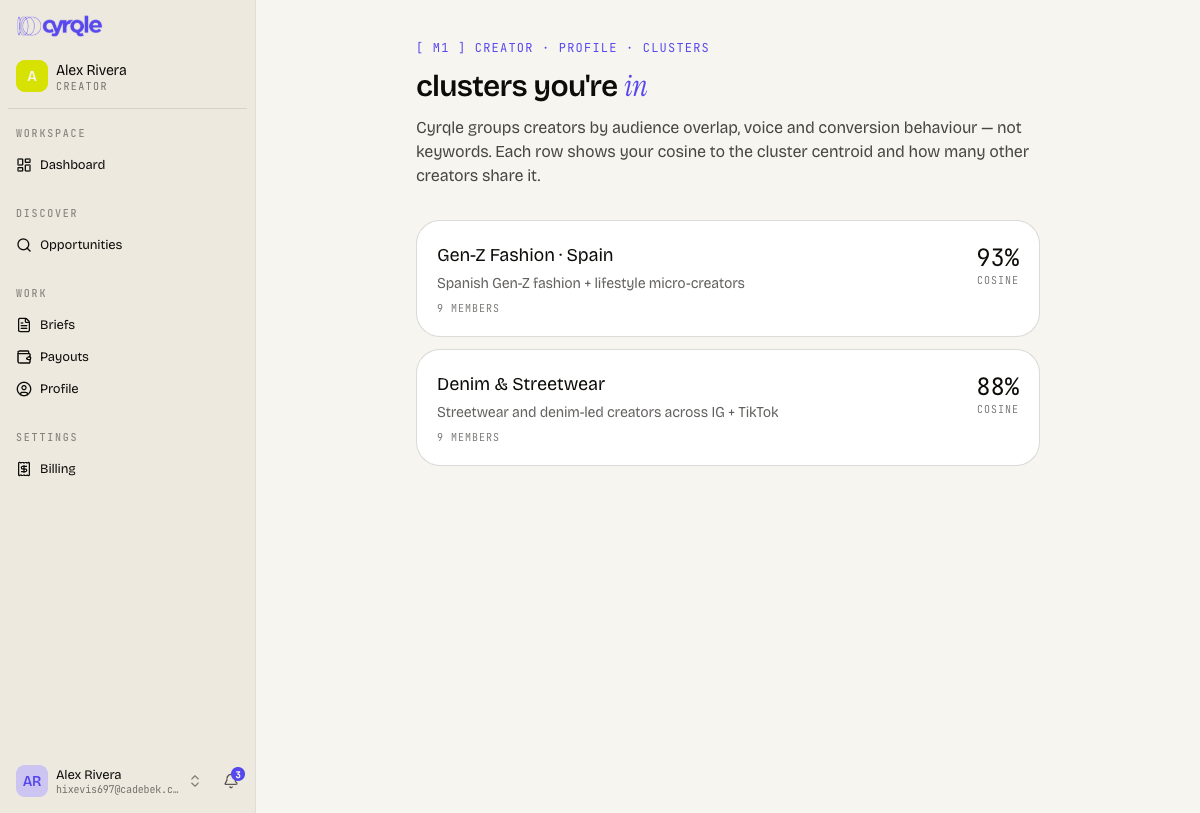
Two things about the clusters page:
- Nothing in the app links to it. Open it by adding
/profile/clustersto your workspace address. - It stays empty until a platform is connected. It reads "Your creator profile isn't linked yet." See Connect your accounts.
Pitfalls
- The panel at the bottom of your profile describes some features as coming soon that already work, such as the audience survey and Stripe payouts. Use this page, not that panel, to decide what is available.
- UGC talent edit a different form. It holds skills, equipment, languages and a maximum turnaround, plus a rate card and samples. See For UGC talent.