Produce and post
After you sign the agreement, the brief becomes your production workspace. Use the checklist, post so Cyrqle can find your content, and submit drafts for review.
Before you start
- Sign the agreement. The production tools stay locked until both sides sign. See Your agreement and content rights.
- Open the brief at least once after you accept. Cyrqle creates your tracking links and promo code when you open the page.
- Post from the account you connected to Cyrqle.
Everything you need to post
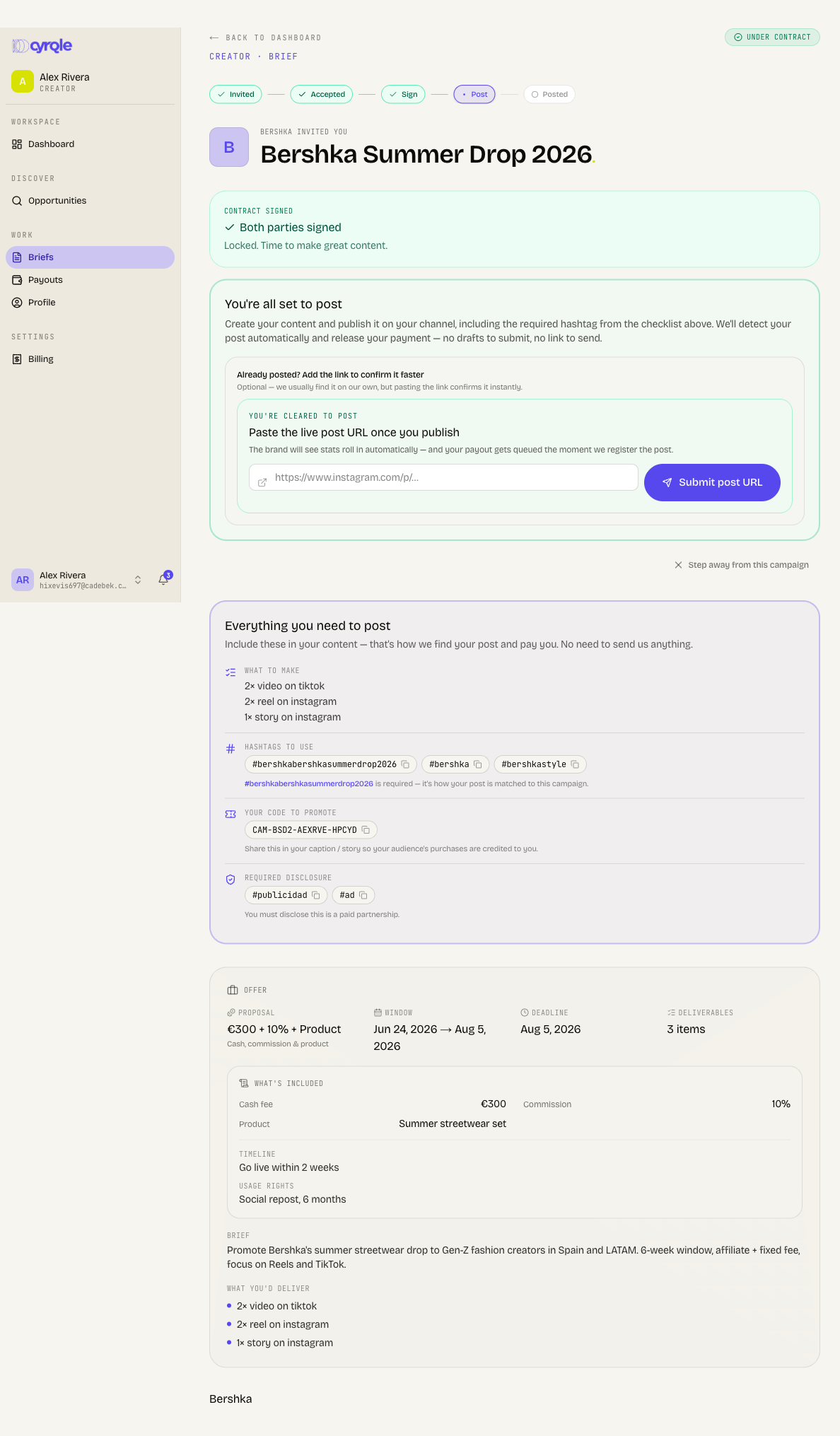
The Everything you need to post card holds every item the brand needs in your content. Every chip copies to your clipboard when you click it.
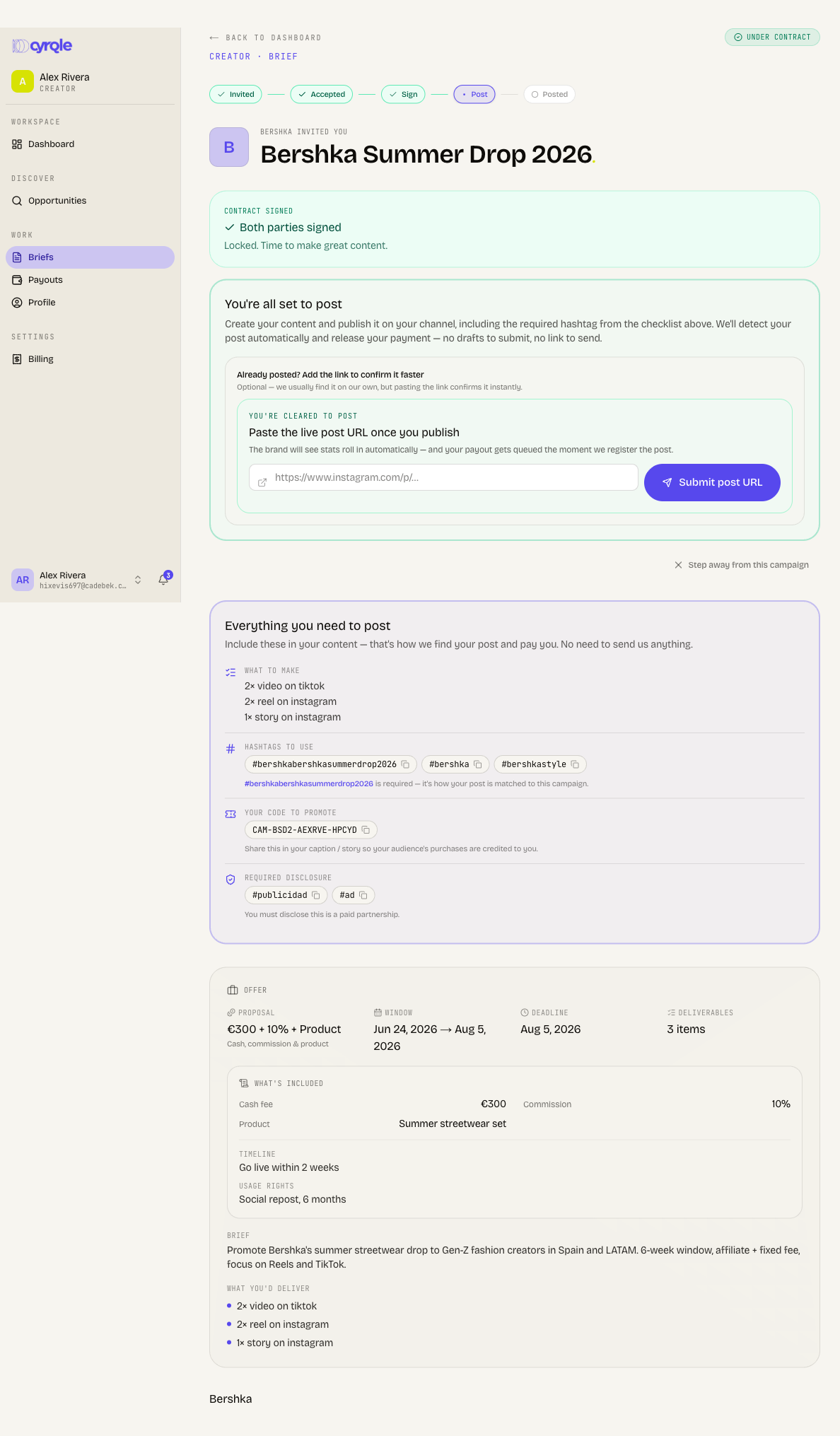
| Block | What it is |
|---|---|
| Your link to share | One short Cyrqle link per planned post. Every click is credited to you. The block reads Your links to share when you have more than one. |
| When to post | The go-live time. The brand can set a time for you alone. |
| What to make | The deliverables you agreed. |
| Hashtags to use | The tracking hashtag plus the brand hashtags. |
| Tag the brand | The brand's handle. |
| Your code to promote | Your own promo code. Purchases with it are credited to you. |
| Required disclosure | The disclosure tags for your country. |
| Do's & don'ts | The brand's own rules. |
A block appears only when the brand supplied that data.
Post so Cyrqle finds your content
Your post passes every test below, or Cyrqle does not attach it.
Cyrqle matches your post by reading your public profile and looking for the tracking hashtag.
Your post must meet all three rules, or Cyrqle does not attach it and does not pay for it:
- Put the tracking hashtag in the caption. A hashtag in a comment, in a story sticker, or inside the image does not count. Cyrqle skips the post.
- Post inside the campaign window. Cyrqle accepts a post from the start date to 14 days after the end date. A post outside that range is held for the brand to review by hand.
- Post from the handle you connected to Cyrqle. A post from a second or backup account is held as an unknown creator.
Open the brief
Select the campaign in Briefs.
Copy the hashtag
Click the required hashtag chip in the checklist.
Copy your link
Click your short link chip. Each link matches one planned post.
Write the caption
Paste the hashtag, the link, your promo code and the disclosure tag into the caption.
Publish
Publish from your connected account, inside the campaign window.
Instagram's "paid partnership" label does not make Cyrqle find your post. The hashtag does. Use the label as well if the brand asks, but never instead of the hashtag.
Track your posts
Campaigns run in one of two modes. Check which card your brief shows.
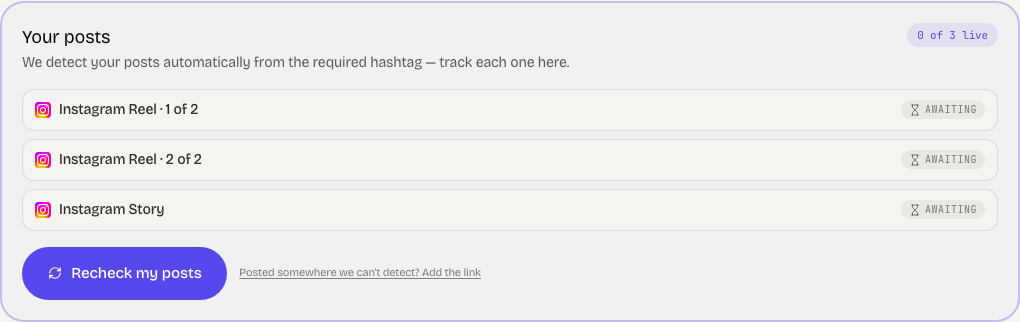
The Your posts card lists one row per planned post. Each row reads Awaiting or Live. A View link appears once Cyrqle finds the post. The card turns green when every row is live.
Click Recheck my posts to ask Cyrqle to look again straight away.
Two limits on this card:
- Recheck my posts works once every 10 minutes per campaign. The wait starts when you press it, even if the check fails. Cyrqle then shows "Just checked, try again in a few minutes."
- Posted somewhere we can't detect? Add the link does not work on automatic campaigns. It asks for an approved draft, and automatic campaigns have none, so it always returns an error. Use Recheck my posts, fix the caption hashtag, or ask the brand to add the post for you.
Pitfalls
- When the brand set no destination address on the brief and connected no store, Cyrqle creates no tracking links. The Your link to share block does not appear at all, with no message. You have nothing to paste, and click tracking is impossible. Ask the brand to add a destination address. Cyrqle creates the links as soon as they do.
- Cyrqle creates your promo code and your tracking links when you open the brief. Open the brief after you accept, before you write the caption.
- Cyrqle detects Instagram posts, carousels, reels, stories and videos, and TikTok videos and carousels. It detects nothing else. A YouTube, X, LinkedIn or Facebook deliverable stays at Awaiting forever and never closes.
- Instagram stories are detected but not measured. Cyrqle confirms the story exists, but reports no reach, views or saves unless you connected Instagram with the platform login. A story campaign with no Instagram connection reports close to zero engagement.
- Your post tracker lists only the deliverables for the platform you connected. An Instagram creator never sees a TikTok row, and cannot fill one.
- Cyrqle picks the disclosure tags from the country on your profile. Set your country, or you get a generic tag that may not satisfy your local rules. See Your profile.