Links you receive
The pages a brand sends you by email or DM: the claim link, the join link, a public campaign link, a rights request, and your signing link.
Before you start
- Open the link on the device you read your email on. Every link signs you in with a code, so you need the inbox you gave the brand.
- Cyrqle never asks for a password on these pages. A six-digit code or a sign-in link is the whole sign-in.
- One link belongs to one creator. Do not forward a claim link or a signing link.
- You do not need an account to open any of these pages. You need one to get paid.
The five links
| Link looks like | What it is | What it asks |
|---|---|---|
/claim/... | A campaign invitation for you alone | Accept, counter or decline, then your email |
/join or /join/... | An invitation to join Cyrqle, with no campaign behind it | Create a profile |
/c/... | A campaign anyone with the link can apply to | Apply |
/g/... | A brand asking to feature a post you already published | Allow or refuse |
/sign/... | The agreement for a campaign you accepted | Your typed signature |
The claim link
This is the link in the email "[brand] invited you to a campaign on Cyrqle". It is the only button in that email.
Read the brief
The page shows the brand, the offer, the deliverables and the dates. It is the same brief a signed-in creator sees.
Answer
Select Accept, Counter or Decline. Cyrqle stores your answer on the invitation and moves you to the next step.
Enter your email
Enter the address you want the brand to reach you on. A phone number is optional, and Cyrqle uses it for campaign updates and for Stripe payout checks.
Select Send my sign-in link
Cyrqle emails a sign-in link to that address. The link expires in 30 minutes. Use Resend sign-in link if it does not arrive.
Open the link in your inbox
Cyrqle creates your free creator workspace, links your handle, and applies the answer you already chose. You land on the brief inside the app.

- A claim link is valid for 90 days from the day the brand sent it, and it works once. After you use it, the same campaign lives in Briefs in your workspace.
- An expired, used or unknown claim link shows a "page not found" screen with no explanation. Ask the brand to send a fresh invitation. Retrying the same link never works.
If you are already signed in to Cyrqle and the invitation is for a handle in your workspace, the claim link skips every step above and opens the brief directly.
The join link
This is the link in "[brand] wants to work with you on Cyrqle" and in a brand's Instagram bio. There is no campaign behind it.
The page says what Cyrqle is and offers one button, Create my profile. If you already have an account, select Sign in instead. Joining commits you to nothing. You still choose which campaigns to accept.
A join link does not expire on a date. A brand can switch its link off, and the page then says the link is no longer active.
A public campaign link
A brand can share one campaign link with many people at once, in a DM, a story or a
group chat. The address starts with /c/.
The page shows the same brief. The button changes with what Cyrqle knows about you:
| What the page says | What it means | What to do |
|---|---|---|
| Like this brief? | You are not signed in. | Enter your handle, then confirm your email. |
| One step left | Your creator profile is unfinished. | Select Finish setting up. |
| Connect your account to apply | No Instagram or TikTok profile is linked. | Select Connect your account. The brand reviews applications by profile. |
| You're signed in as a brand | You are in a brand workspace. | Sign in with your creator account. |
| You're in | You already applied. | Select Open the brief. |
Applying adds you to the campaign as a proposed creator. The brand still has to accept you. Applying twice changes nothing.
A public campaign link only works while the brand is recruiting. Once the campaign closes recruiting, the link shows a "page not found" screen.
A rights request
A brand sends this when it likes a post you already published and wants to feature
it. The address starts with /g/. It is free, and it is a re-share, not a campaign.
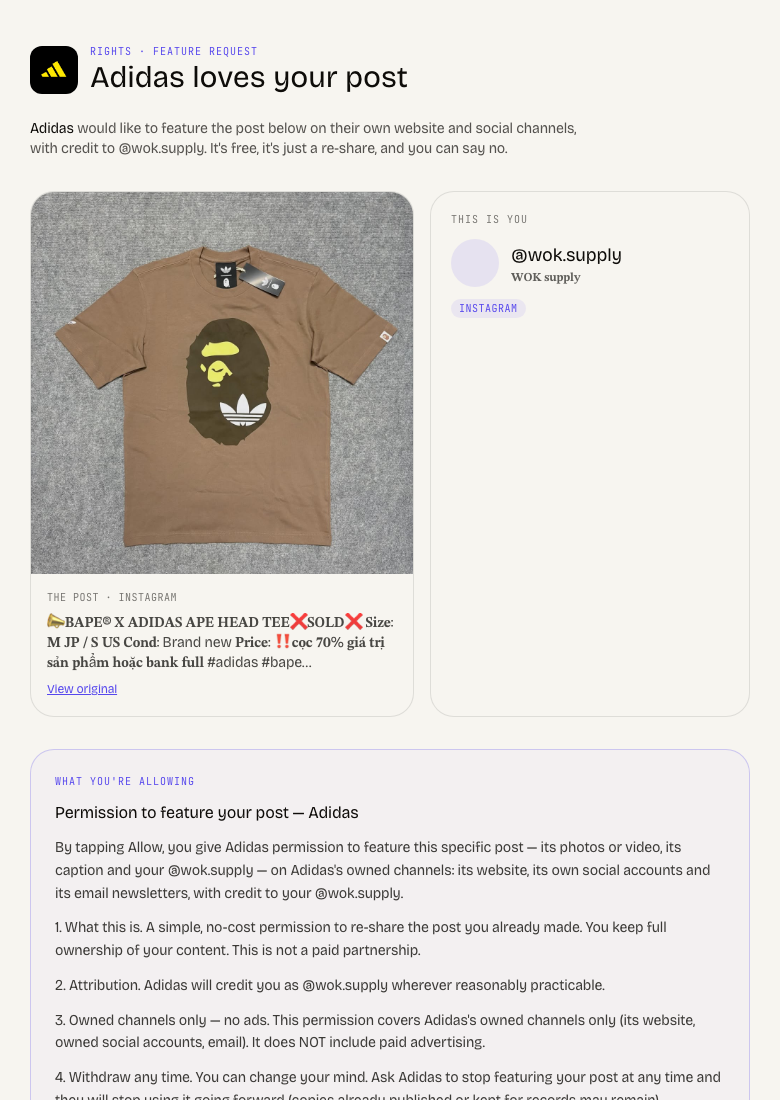
Check the post
The page shows your post, your profile, the brand asking, and a block headed "what you're allowing".
Decide
Select Allow [brand] to feature this, or select No thanks.
Add your email if you want an account
Your email is optional. Cyrqle records your permission the moment you select Allow, with or without it.
Enter the code
If you gave an email, Cyrqle sends a six-digit code and opens a free creator workspace for you. Select Skip for now to stay without an account.
A rights request link is valid for 30 days. After that the page says the link has expired, and you ask the brand to send a new one.
To change your mind, open the same link again. The receipt page carries Changed your mind? Ask them to stop featuring it. Confirming revokes the licence and the brand's walls drop the post on their next refresh.
See Your agreement and content rights for what a grant licenses.
Your signing link
After you accept an offer, the brand sends the agreement. The address starts with
/sign/. The terms on that page are locked, and they are what binds you.
The page asks for three things: a tick on the platform terms, a tick on the brand's campaign terms when the campaign has them, and your full name typed in the name field. Then select Accept and sign.
Cyrqle records the time, your IP address and your device as the audit trail. Download as PDF saves a copy before or after you sign.
A signing link expires. An expired link says so and tells you to reply to the brand, who can issue a fresh link with updated terms. A withdrawn agreement says the contract was withdrawn.
The full signing procedure is on Your agreement and content rights.
Your tracked link and your code
Once you are under contract, the brief shows Your link to share and Your code to promote. Both are yours alone.
- The link is a short Cyrqle address. Paste it into the post it belongs to. Every click is counted and credited to you.
- The code goes in your caption or story, so your audience's purchases are credited to you.
A campaign only produces a link and a code when the brand set a destination URL and minted the codes. If the brief shows neither, there is nothing missing on your side.
Pitfalls
- Never forward a claim link or a signing link. Both are bound to one creator. Anyone who opens a signing link can sign the agreement in your name.
- Older invitations point at an address starting with
/invite/campaign/. That address forwards to the current claim link. Nothing is lost. - The sign-in link from a claim page expires in 30 minutes. Request a new one rather than reusing an old email.