Notifications and emails
Every message Cyrqle sends: what triggers it, who receives it, what to do, and which toggle silences it.
Before you start
- Open the user menu at the bottom of the sidebar and select Account.
- Select Notifications to open the preference page.
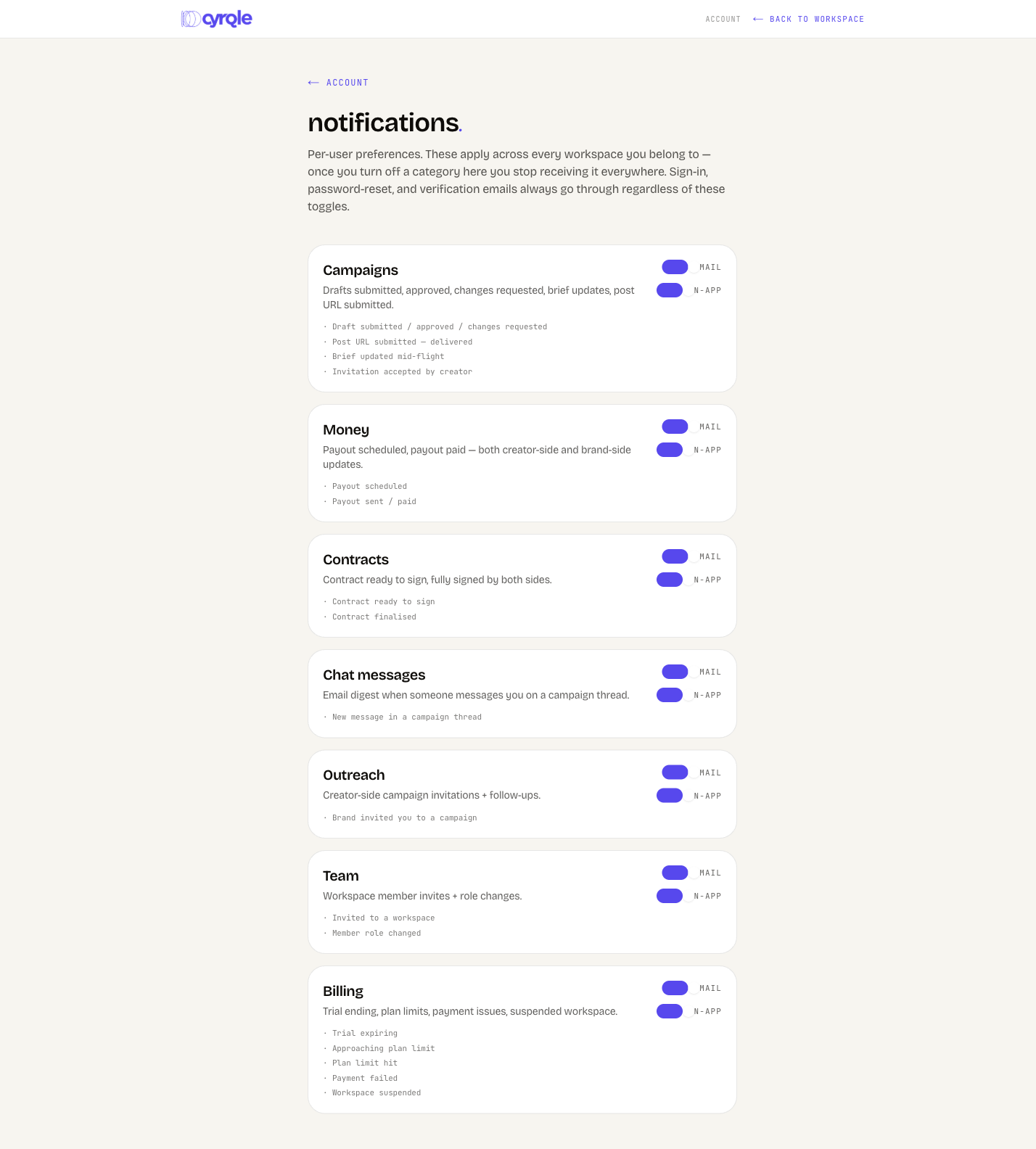
- The page shows only the categories your account types can receive. A creator never sees Team or Billing.
- Cyrqle uses two channels: the bell in the app, and email.
- One preference controls both channels for a category. It applies to your user account in every workspace you belong to.
Steps
Open the bell
Select the bell in the top bar. Cyrqle shows the 20 most recent notifications.
Select a notification
Cyrqle marks it read and opens the screen that needs you. A brand-side message opens the campaign Outreach tab with that creator selected. A creator-side message opens the brief.
Clear the rest
Select Mark all read. The badge count returns to zero.
Turn a category off
Open Account, then Notifications. Switch Email or In-app off on the category you do not want.
Turning a category off stops both the email and the bell row for that category, in every workspace. Nothing is queued for later. You lose the message.
The seven categories
Each category is one switch pair on the Notifications page.
| Category | On-screen description | Who can receive it |
|---|---|---|
| Campaigns | Drafts submitted, approved, changes requested, brief updates, post URL submitted. | brand, agency, creator, UGC talent |
| Money | Payout scheduled, payout paid, both creator-side and brand-side updates. | brand, agency, creator, UGC talent |
| Contracts | Contract ready to sign, fully signed by both sides. | brand, agency, creator, UGC talent |
| Chat messages | Email digest when someone messages you on a campaign thread. | brand, agency, creator, UGC talent |
| Outreach | Creator-side campaign invitations and follow-ups. | creator, UGC talent |
| Team | Workspace member invites and role changes. | brand, agency |
| Billing | Trial ending, plan limits, payment issues, suspended workspace. | brand, agency |
Sign-in, password-reset and verification emails have no switch. They always go out. Cyrqle treats them as security mail.
What a creator receives
Emails
| Subject you see | What triggered it | What to do |
|---|---|---|
| [brand] invited you to a campaign on Cyrqle | A brand invited you to a campaign. | Select Review the brief and accept, counter or decline. |
| [brand] invited you to another run [campaign] | The same brand invited you to a later run of a campaign you already worked on. | Review the new run separately. The earlier run stays as it is. |
| [brand] wants to work with you on Cyrqle | A brand invited your handle to join Cyrqle. There is no campaign behind it yet. | Select Create my profile. |
| New offer on [campaign] | The brand countered your terms, or confirmed the agreed terms. | Open the brief and accept or counter again. |
| Contract ready: [campaign] | The brand sent the agreement. | Open the link, read the locked terms, and sign. |
| Reminder: sign your [campaign] contract | The agreement is still unsigned. | Sign it, or ask the brand for new terms. |
| Contract finalised [campaign] | Both parties signed. | Start production. Download the PDF for your records. |
| You're in [campaign] | Your acceptance was recorded. | Wait for the agreement. |
| Your draft on [campaign] | The brand approved your draft or requested changes. | Open the draft and publish, or send a revision. |
| Your revision is due [campaign] | Requested changes have been open for several days. | Send the revision. |
| Time to publish [campaign] | The scheduled go-live date arrived. | Publish, and include the required hashtag. |
| Brief updated [campaign] | The brand changed the brief mid-campaign. | Read the changes before you produce. |
| Delivered [campaign] | Cyrqle detected your published post. | Nothing. Tracking has started. |
| [amount] on the way [campaign] | The brand released your payout. | Expect the funds in about five banking days. |
| Dispute resolved [campaign] | A payout dispute was closed. | Read the outcome on the payouts page. |
| You're all set, payouts are active | Stripe verified your payout account. | Nothing. |
| Stripe needs a bit more from you | Stripe wants more identity detail. | Open the payout settings and finish the checks. |
| Your payouts are paused | Stripe restricted your account. | Open the payout settings and review your details. |
| [brand] would love to feature your post | A brand asked to feature a post you already published. | Open the link and select Allow or No thanks. |
| Thank you from [brand] | The brand sent a thank-you after the campaign. | Nothing. |
| Wrapped: [brand] [campaign] | The collaboration closed. | Read the summary. |
| [name] on [campaign] | Someone messaged you in the campaign thread. | Reply in the brief chat. |
| Reminder: [name] is waiting on your reply | Your thread has an unanswered message. | Reply. |
| Your cyrqle sign-in code | You asked to sign in with a code. | Enter the six digits. The code expires in 10 minutes. |
In-app notifications
| Bell row | What triggered it | Where it opens |
|---|---|---|
| [brand] invited you | A campaign invite. | The brief |
| [brand] invited you to another run | A later run of the same campaign. | The brief |
| [brand] countered at [amount] | The brand changed your rate. | The brief |
| Terms agreed | Both sides settled the deal. | The campaign |
| [brand] sent you a contract | The agreement is ready. | The brief |
| [brand] signed the contract | The brand signed first. | The brief |
| Contract fully signed | Both parties signed. | The brief |
| Contract awaiting signature | The signing link is still open. | The brief |
| Contract cancelled | The brand withdrew the agreement. | The brief |
| [brand] approved your draft | Your draft passed review. | The brief |
| [brand] requested changes | Your draft needs a revision. | The brief |
| Revision overdue | A requested change is late. | The brief |
| Time to publish | The launch date arrived. | The brief |
| [brand] updated the brief | The brief changed mid-flight. | The brief |
| [brand] withdrew | The brand left the collaboration. | The brief |
| New message from [brand] | A chat message. | The brief |
| Payout scheduled | Your payout is queued. | Payouts |
| You have been paid | Funds left Cyrqle. | Payouts |
| Payout settled | Funds arrived in your bank account. | Payout settings |
| Payout failed | Stripe could not complete the transfer. | Payout settings |
| Dispute resolved | A dispute closed. | Campaign payouts |
| Payouts are active | Stripe verified you. | Payout settings |
| Stripe needs more info | Verification is incomplete. | Payout settings |
| Payouts paused | Stripe restricted the account. | Payout settings |
| Reconnect your account | Your linked social account stopped updating. | The connect page |
| @handle cleared rights / declined / withdrew rights | A rights decision on your content. | The library |
What a brand or agency receives
Emails
| Subject you see | What triggered it | What to do |
|---|---|---|
| @handle accepted [campaign] | A creator accepted your offer. | Send the agreement. |
| New offer on [campaign] | A creator countered your terms. | Accept, counter or decline. |
| @handle submitted a draft on [campaign] | A draft is waiting. | Review it in the Content tab. |
| A draft is waiting for your review [campaign] | A draft has waited several days. | Approve it or request changes. |
| Contract finalised [campaign] | Both parties signed. | Production starts. |
| @handle is live [campaign] | Cyrqle detected the creator's post. | Nothing. Tracking has started. |
| Post not detected yet [campaign] | The scheduled post did not appear. | Message the creator. |
| Payout queued [amount] to @handle | You committed a payout. | It releases when you settle the campaign. |
| Payout sent [amount] to @handle | The transfer left your balance. | Nothing. |
| Action needed: [amount] payout to @handle | A payout cannot proceed. | Open the campaign Payouts page. |
| Dispute resolved [campaign] | A payout dispute closed. | Read the outcome. |
| Wrapped: @handle on [campaign] | The collaboration closed. | Read the results. |
| [name] on [campaign] | A creator messaged you. | Reply in the thread. |
| Reminder: [name] is waiting on your reply | Your thread has an unanswered message. | Reply. |
| Heads up, your trial ends soon | The trial is close to its end date. | Pick a plan. |
| Approaching your plan limit | You used most of a metered allowance. | Upgrade, or slow down. |
| You hit your plan limit | A cap is reached and the action is blocked. | Upgrade to lift the cap. |
| Payment issue on [workspace] | A charge failed. | Update the billing details. |
| Workspace [workspace] suspended | Billing stayed unresolved. | Contact your account manager. |
| [member] to [workspace] on Cyrqle | Someone invited a member to the workspace. | Accept the invite. |
| [campaign] [period] report | A scheduled campaign report. | Open or forward the report. |
In-app notifications
| Bell row | What triggered it | Where it opens |
|---|---|---|
| @handle accepted / @handle declined | A creator answered your invite. | Outreach, with that creator selected |
| @handle countered at [amount] | A creator changed the rate. | Outreach |
| Terms agreed | The deal is settled. | Outreach |
| @handle countersigned | The creator signed. | Outreach |
| Contract fully signed | Both parties signed. | Outreach |
| @handle submitted a draft | A draft needs review. | Outreach |
| Draft awaiting review | A draft has waited too long. | Outreach |
| @handle published | A post went live. | Outreach |
| Post not detected yet | The post did not appear. | Outreach |
| @handle stepped away | The creator left the collaboration. | Outreach |
| New message from @handle | A chat message. | Outreach |
| @handle cleared rights | A creator granted usage of a post. | The library, Cleared |
| @handle declined | A rights request was refused. | The library, Requests |
| @handle withdrew rights | A creator revoked a licence. | The library, Cleared |
| Payout needs action | A payout is blocked. | Campaign payouts |
| Trial ends in N days | The trial is close to its end. | The plan picker |
| Payment failed | A charge failed. | Billing |
| Payment received | The workspace is active again. | Billing |
| N% of [metric] | You crossed 80 percent of a cap. | Billing |
| [metric] cap reached | A cap is full. | The plan picker |
| Workspace suspended | Billing stayed unresolved. | Billing |
Pitfalls
- The bell holds the 20 most recent notifications and has no archive page. A busy week pushes older rows out of reach. Act on what needs you, or use the email.
- The bell polls every 30 seconds. A new notification can take that long to appear.
- The bell is personal, not per workspace. It mixes rows from every workspace you belong to, and each row opens in the workspace that produced it.
- Cyrqle can pause cold outreach mail across the platform to protect the sending domain. The pause stops campaign invitations, Join Cyrqle invitations, thank-you mail and rights requests. Payout, contract and draft mail always goes out.