Search and embeddings
Run the embedding pipeline, read cluster and similarity health, and use the read-only data explorer.
Discovery matches a brief to creators by comparing vectors.
Before you start
- Any staff role can watch a run. data-ops and above can start one.
- Image embedding and the full pipeline cost money. Text runs cost little.
- Read the recommendation banner before you press anything.
The pipeline in four steps
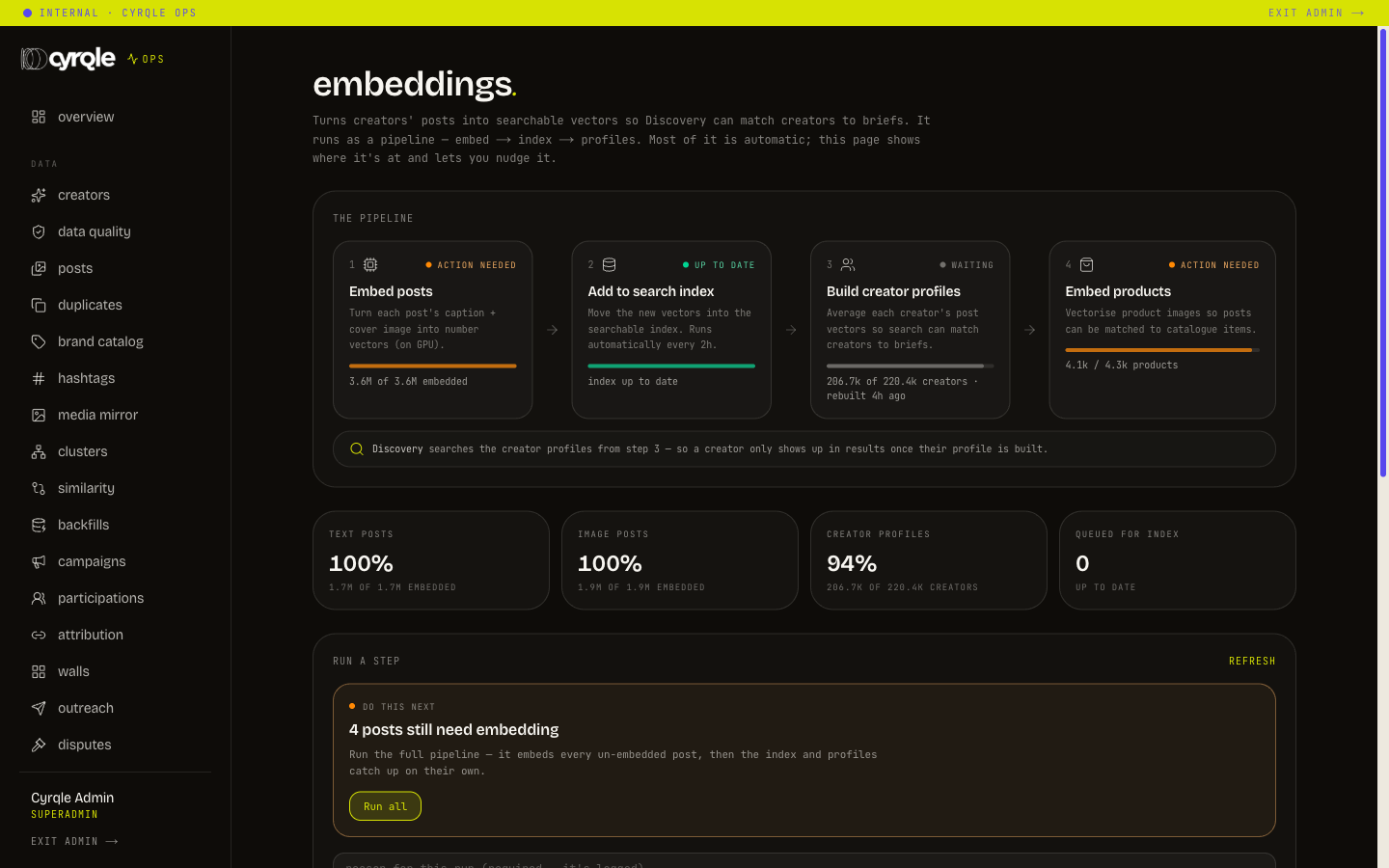
/admin/embeddings groups the jobs in the order the data moves.
| Step | Jobs | When to reach for it |
|---|---|---|
| everything | Run all | The usual button. Embeds every new post, then the index and profiles catch up on their own |
| embed | Text posts, Image posts, Products | Only to embed a single lens. Run all already covers these |
| index | Flush text, Flush image | Rarely needed. This runs automatically every two hours. Use it to force a catch-up now |
| profiles | Text profiles, Image profiles | After a large embed, so Discover searches the freshest data. Fast and free |
Read the banner
The recommendation banner reads "do this next", "in progress" or "all good". If it says all good, stop.
Write the reason
Enter it in the reason field. The reason is required and it is recorded.
Start the job
Click the job button. Run all is the default choice.
Watch the progress
The page tracks each stage with an estimated finish time.
- Image embedding and Run all use paid computing time. Both are marked as costly on the page. Do not press them to "see if it helps".
- A button greyed out means that job is already running. The pipeline holds a lock per job so two runs cannot overlap.
- If the pipeline is not configured for this deployment, the panel answers with a configuration message and nothing runs. Raise it with engineering rather than retrying.
- Support can watch a run they cannot start. Send a support colleague this page during an incident so they can report progress.
Debug a bad match
Check the creator
Open the creator's detail page and read the embedding and coverage panel. No vector means no match.
Check the neighbours
Open /admin/creators/similarity and centre it on the handle.
Read the distance
A cosine distance of 0 is identical and 1 is unrelated. Neighbours that read as unrelated mean the text used to build the vector is wrong, not that ranking is wrong.
Check the clusters
Open /admin/creators/clusters and read corpus coverage and largest share, per lens.
- Low corpus coverage means many creators are not in any cluster, so recall suffers before ranking is ever involved. Report coverage before you report a ranking complaint.
- Reseeding clusters is a pipeline job, not a button on the cluster page. Request it from data-ops.
Explore
/admin/explore is a read-only browser over every table, cross-tenant. The page states its own rule: "Read-only view of every table. Cross-tenant and audit-logged. SELECT only, no writes."
Pick a table
Choose one from the left rail. Each entry shows an estimated row count.
Filter
Pick a column, type into "contains…", then click filter.
Open a row
Click the row to open the drawer. Linked records are navigable.
Export
Use the csv or json link if you need the rows outside the console.
- Every view and every export here is recorded with your name and the row count. Explore is the last resort, not the first stop. Use the named screens where one exists.
- Results and exports are capped. A short result is not proof that no more data exists. Narrow the filter.
Pitfalls
- New posts do not appear in search immediately. The index catches up every two hours. Wait one cycle before you force a flush.
- Rebuilding profiles without embedding first rebuilds them from the old vectors. Run the embed step, then profiles, in that order. Run all does this for you.