Platform controls
Every runtime tunable in the console, what each one changes, the kill switches, and the quota dials.
/admin/controls holds the runtime settings of the platform. Changing one takes effect without a deploy. This is the most consequential screen in the console after the money screens.
Before you start
- Any staff role can read the values. Only a superadmin can change them.
- Lower roles see "Editing controls requires the superadmin role. Current values are read-only for [role]."
- Every save is recorded with the exact difference.
How the page works
Code defaults apply until you override a field here. A field that has been overridden carries an override chip. A field you have edited but not saved shows a green dot. Values are clamped to each field's minimum and maximum when you save.
Find the group
Scroll to the group that owns the setting.
Change the value
Type the new value. The save button counts your pending changes.
Save
Click the save button. A confirmation reports how many changes were saved.
Undo
Click reset to discard unsaved edits.
Creator refresh
| Setting | Default | What it changes |
|---|---|---|
| max creators / platform / run | 2000 | The hard ceiling on how many creators one refresh run scrapes per platform |
| posts since (days) | 90 | How far back a TikTok post pull reaches |
| TikTok posts / profile | 100 | The most posts pulled per TikTok profile |
| Instagram chunk size | 200 | How many Instagram handles go in one call |
| TikTok chunk size | 100 | How many TikTok handles go in one call |
| Instagram about-section by default | off | Pulls the Instagram about section at a small extra cost per profile |
| public-apply profile pulls / day | 500 | Profile scrapes allowed per rolling day across every public campaign link |
The public-apply setting is the abuse ceiling. That path accepts requests without a sign-in, so anyone can trigger those scrapes. Raise it only with a reason, and watch spend after you do. Set it to 0 to accept index-only matches and spend nothing.
Data runs
This group is labelled Apify on the page, after the data vendor.
| Setting | Default | What it changes |
|---|---|---|
| Apify dedup TTL (min) | 60 | Reuse an identical run from the same workspace inside this window instead of paying again. 0 turns reuse off |
Ranking
| Setting | Default | What it changes |
|---|---|---|
| Find community expansion | 0 | Graph-based recall for Find. 0 is off, 0.5 is the recommended value. Adds one query per search |
| Find lexical (BM25) arm weight | 0 | The weight of the keyword arm in the blend. Keep it low |
| Find lexical brand routing | off | Also matches the brand's own identity words in the keyword arm |
- Set the lexical weight low. A high weight makes keyword matching dominate and makes results worse, not better. A value near 0.5 adds a useful tail. Widening the pool also adds latency.
- Brand routing does nothing while the lexical weight is 0. Turn the weight up first, or the toggle has no effect at all.
Creator classification
| Setting | Default | What it changes |
|---|---|---|
| creators examined per sweep | 500 | How many unclassified creators the hourly sweep looks at. Free steps only |
| LLM escalations per sweep | 200 | How many of those are escalated to the paid classifier. This is the sweep's only cost. 0 keeps it free |
| creators needed to kick embedding | 50 | An import of at least this many creators starts the embedding cycle immediately instead of waiting for the nightly run. 0 always waits |
An unclassified creator is invisible to every search surface. If the backlog grows, raise the sweep size before customers report missing creators.
Connected accounts
| Setting | Default | What it changes |
|---|---|---|
| connections refreshed / run | 200 | How many connected social accounts are synced each cycle, oldest first |
| hours between connection syncs | 20 | Skip an account synced more recently than this |
- Setting connections refreshed per run to 0 pauses the sync entirely. Instagram connections then lapse after 60 days and customers have to reconnect. Never leave it at 0.
- Lower the hours between syncs only to catch stories, which disappear after 24 hours. Below 24 hours the cycle must also run more than once a day to have any effect.
Attribution ingest
| Setting | Default | What it changes |
|---|---|---|
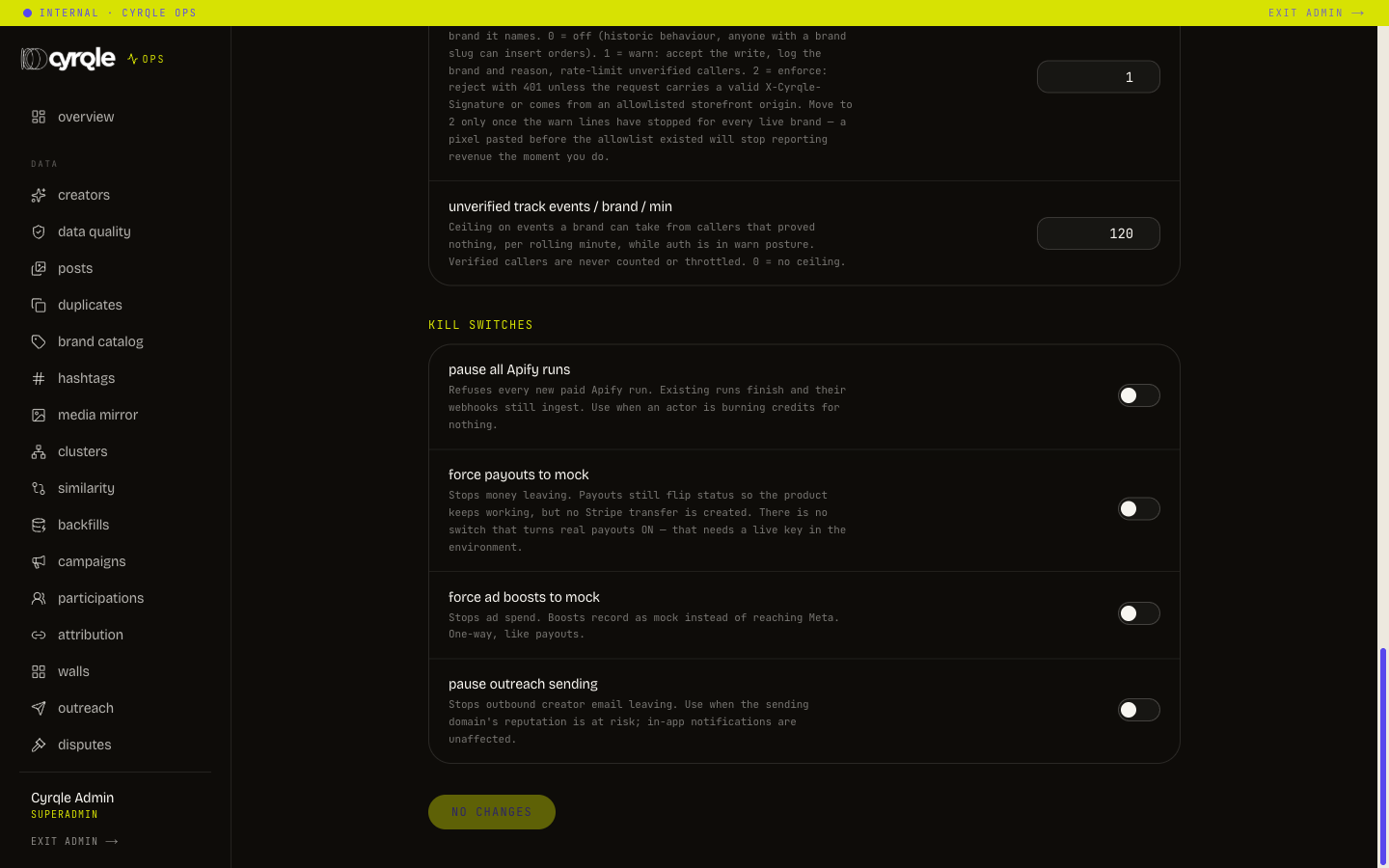
| attribution ingest auth | 1 | How hard Cyrqle checks the caller sending storefront traffic. 0 is off, 1 warns and rate-limits, 2 refuses anything unsigned |
| unverified track events / brand / min | 120 | The ceiling per brand per minute while the check is in warn mode. Verified callers are never counted. 0 removes the ceiling |
Move the auth setting to 2 only after the warning lines have stopped for every live brand. A tracking snippet installed before the allowlist existed stops reporting revenue the moment you enforce. Read /admin/ops/ingest first.
Kill switches
Each switch can only make the system safer. None of them turns anything on.
| Switch | Default | Effect |
|---|---|---|
| pause all Apify runs | off | Refuses every new paid data run. Runs already going finish and still ingest |
| force payouts to mock | off | No payment is created. Statuses still move |
| force ad boosts to mock | off | Boosts record as a test and never reach the ad platform |
| pause outreach sending | off | Stops outbound creator email. In-app notifications keep working |
- These switches are one-way. Turning real payouts or real ad spend back on needs an environment change and a deploy, not a click here. Flip one only in an incident and tell engineering immediately.
- A flip takes up to five seconds to apply everywhere. Do not conclude a switch failed within the first few seconds.
- If the database is unreachable the switches are ignored and the system behaves as if they are off. That is deliberate: every payout silently turning into a test is a worse incident than a briefly unenforced switch. Confirm the switch held after the incident.
Quota dials
/admin/ops/quota shows the ceilings Cyrqle sets against live consumption: data runs, data spend, monitored collector sources, unverified tracking ingest, outbound creator email, creator refresh per run, connection refresh per run, public apply scrapes, and the embedding backlog.
- There is no platform-wide ceiling on data spend. The dial reads "operator judgement". Spend is tracked, never blocked. Pausing data runs is the only stop.
- These are the limits Cyrqle sets, not the limits a vendor sets. A dial reading "no hard cap" means Cyrqle chose not to set one.
What is not on this page
Three settings are not on this page: the media-value rate card, monthly collector budgets, and discovery weights other than the three ranking dials above. Collector budgets are set per source inside the customer's own workspace.
There is no feature-flag console. The nearest equivalents are this page, the plan features in the catalogue, and per-licence feature overrides.
Pitfalls
- A value here changes behaviour for every workspace at once. There is no per-customer setting on this page. Write the reason for the change somewhere a colleague reads.
- Values are clamped to each field's minimum and maximum on save. A saved value that differs from the one you typed was out of range, not ignored.