Money and payouts
The money dashboards, the ledger, who can actually be paid, the dispute queue, and the two switches that stop money leaving.
Money questions arrive as "the creator was not paid" or "the brand was charged twice". This page tells you which screen answers which question, and what staff can and cannot change.
Before you start
- Any staff role can read every money screen.
- Only a superadmin can act on a payout, and only with a fresh sign-in.
- Nothing on these screens sends money. Sending happens when a campaign pays out.
The money screens
| Screen | Question it answers |
|---|---|
| /admin/money | How much is moving this week, in and out |
| /admin/money/payouts | What happened to one creator's payment |
| /admin/money/connect | Who can actually be paid, and who is blocked |
| /admin/money/ledger | Funding in, payouts out, credits, and the float |
| /admin/money/revenue | What Cyrqle earns, and churn |
| /admin/campaigns/disputes | Everything contested, oldest first |
The money dashboard
/admin/money is labelled "Payouts, campaign funding, credits, live". Four numbers: payouts paid, payouts pending with a count, campaign funding, credits issued. Three charts: funding per week, payouts by status, payouts paid per week. Below them, recent payouts and recent funding.
Payouts
/admin/money/payouts shows the latest 100 payouts with status chips and counts. Columns: creator, campaign, status, funding, creator amount, commission, total, created. A failed payout carries a warning chip; hover it to read the failure reason.
The page shows the latest 100 only. For anything older, use the csv or json export, or search the creator from Cmd-K.
Payout actions are not available in the console
Retry and reverse have no button today. Both are operations procedures run by engineering, requiring superadmin and a fresh sign-in. Do not promise a customer that you can retry a payment yourself.
What each one does, so you can request the right one:
Retry. Only a failed payout can be retried. The status goes back to pending and the failure reason is cleared. The restriction exists because retrying a paid payout would send a second payment for the same work.
Reverse. Only a paid payout can be reversed.
Reversal does not pull money back. A settled transfer is in the creator's account and Cyrqle cannot take it. Reversal records a dispute and moves the row into the dispute queue. Recovery is a conversation with the creator.
Both need a written reason of at least three characters.
Connect health
/admin/money/connect is the page that answers "why has this creator not been paid".
Tiles: connected, payable, blocked, mid-onboarding, requirement deadlines, and money stuck, which is money queued behind a blocked account. Blocked accounts with money waiting sort first.
The column that decides payment is payouts enabled, not details submitted. A creator who finished the form can still be blocked. Read the payouts-enabled column, never the submitted one.
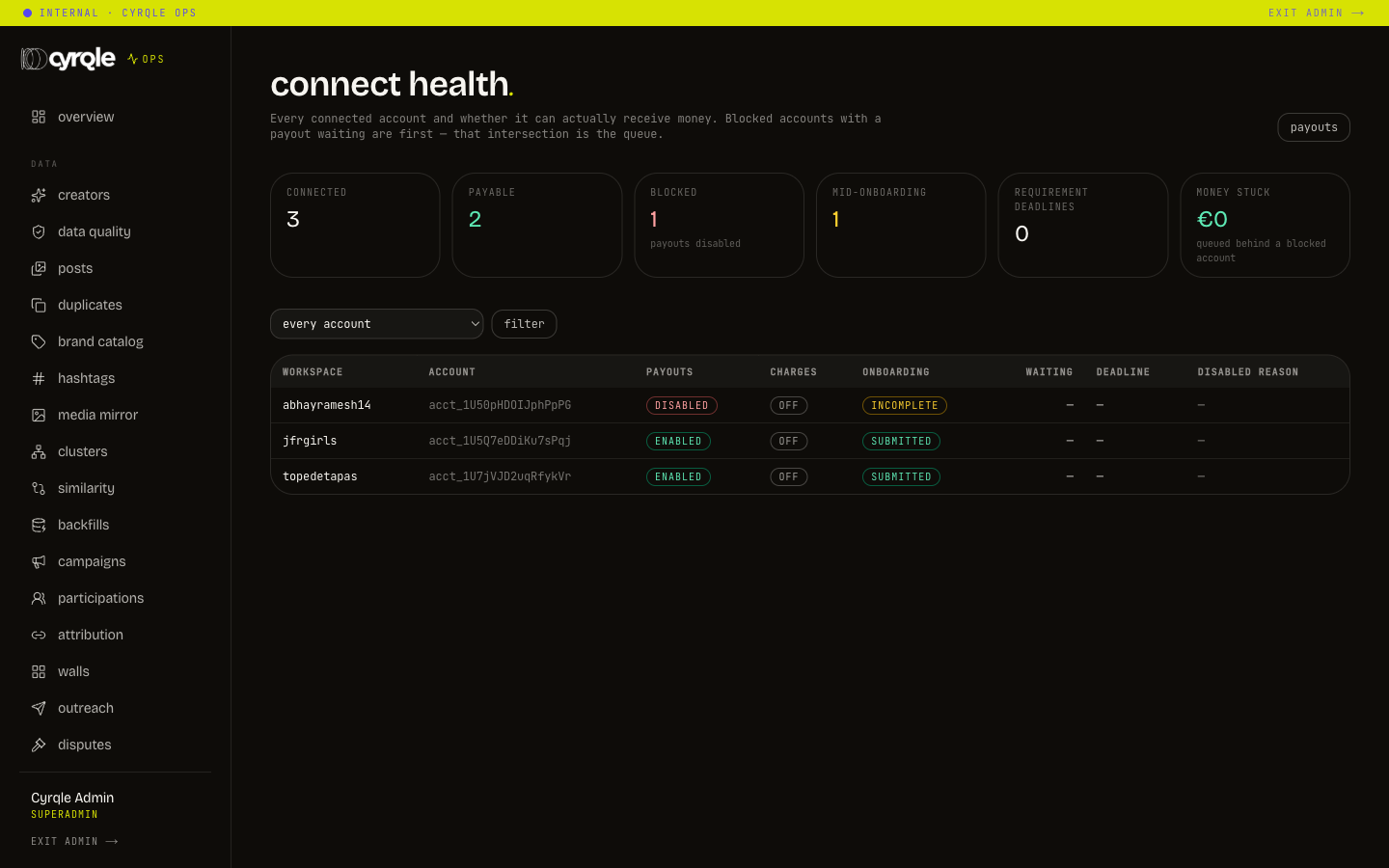
A requirement deadline means the payment provider needs more information by a date. After that date the account stops being payable. Work those before they expire.
The ledger
/admin/money/ledger puts funding in, payouts out and credits on one screen, with a float line.
The float line is labelled "float (ours, not the bank)". It is funded minus refunded minus paid, derived from Cyrqle's own records. It is not a bank balance and must never be quoted as one.
Filter the credit ledger by kind: grant, topup, debit or refund.
Revenue
/admin/money/revenue shows booked monthly recurring revenue from Cyrqle's own licence rows, with comped licences counted separately. It also shows attributed sales, which are the brand's revenue and not Cyrqle's, the commission actually taken on paid payouts, and churn split into cancelled and suspended. Windows: 30, 90 or 365 days.
Cancelled and suspended are different stories. Cancelled is usually a decision. Suspended is usually a card that stopped working. Read them apart before you report churn.
The dispute queue
/admin/campaigns/disputes collects three things: disputed payouts, failed payouts, and campaign posts in arbitration. Age drives the colour: amber at 3 calendar days, red at 7.
Age is measured from when the row was created, not from when it became contested. A payout that failed yesterday on a campaign from March shows as months old. Treat the age as an upper bound and read the row.
Switches that stop money
Two switches live on /admin/controls. Both are one-way: each can only make the system safer.
| Switch | Effect |
|---|---|
| force payouts to mock | No payment is created. Payout statuses still move, so the product keeps working |
| force ad boosts to mock | Boosts are recorded as a test and never reach the ad platform |
There is no switch that turns real payouts back on. Turning real payouts on again needs an environment change and a deploy. Flip these only in an incident, and tell engineering the moment you do.
A flip takes up to five seconds to apply everywhere. If the database is unreachable the switches are ignored. That is deliberate: every payout turning into a test is a worse incident than a briefly unenforced switch.
Automation and money
Automation sends reminders and re-queues work. It never moves money. One exception exists: a licence that stays past due for 14 days is suspended automatically by the reminder sequence.
Pitfalls
- Demo workspaces force payouts and boosts to the test path. A demo payout proves nothing about a live one.
- Payout exports deliberately leave out the payment provider identifiers, because those identifiers are credentials to anyone with a provider login. If a ticket needs one, ask finance.