Creator data operations
Browse the creator index, run a paid refresh, read the data-quality reports, and erase a creator on request.
The creator index is the data every search, every match and every wall depends on.
Before you start
- Any staff role can read every creator screen.
- data-ops and above can start a refresh run.
- Only a superadmin can erase a creator.
- Refresh runs spend real money on every click.
Browse the index
Filter
Set any of: the search box "search handle or name…", country, platform, minimum followers, maximum followers, and "not updated in".
Read the count
The header shows how many creators match.
Open a creator
Click the row.
Any filter change resets to the first page. When nothing matches the page reads "No creators match."
The creator detail page
The header shows the avatar, the handle, the platform and the full name. The facts grid shows followers, following, posts, engagement, cadence, fake-follower score, country, category, verification, last post, last scrape and first scrape.
The embedding and coverage panel tells you whether this creator is searchable: whether the text vector and the image vector exist, how many of their posts have vectors, and whether the post coverage is continuous or has gaps. A creator with missing vectors does not appear in search.
Below that: contact methods and the latest 12 posts.
Run a paid refresh
This is the only screen in the console that spends money on every click. There is no spend ceiling. Check the estimate line before you start, every time.
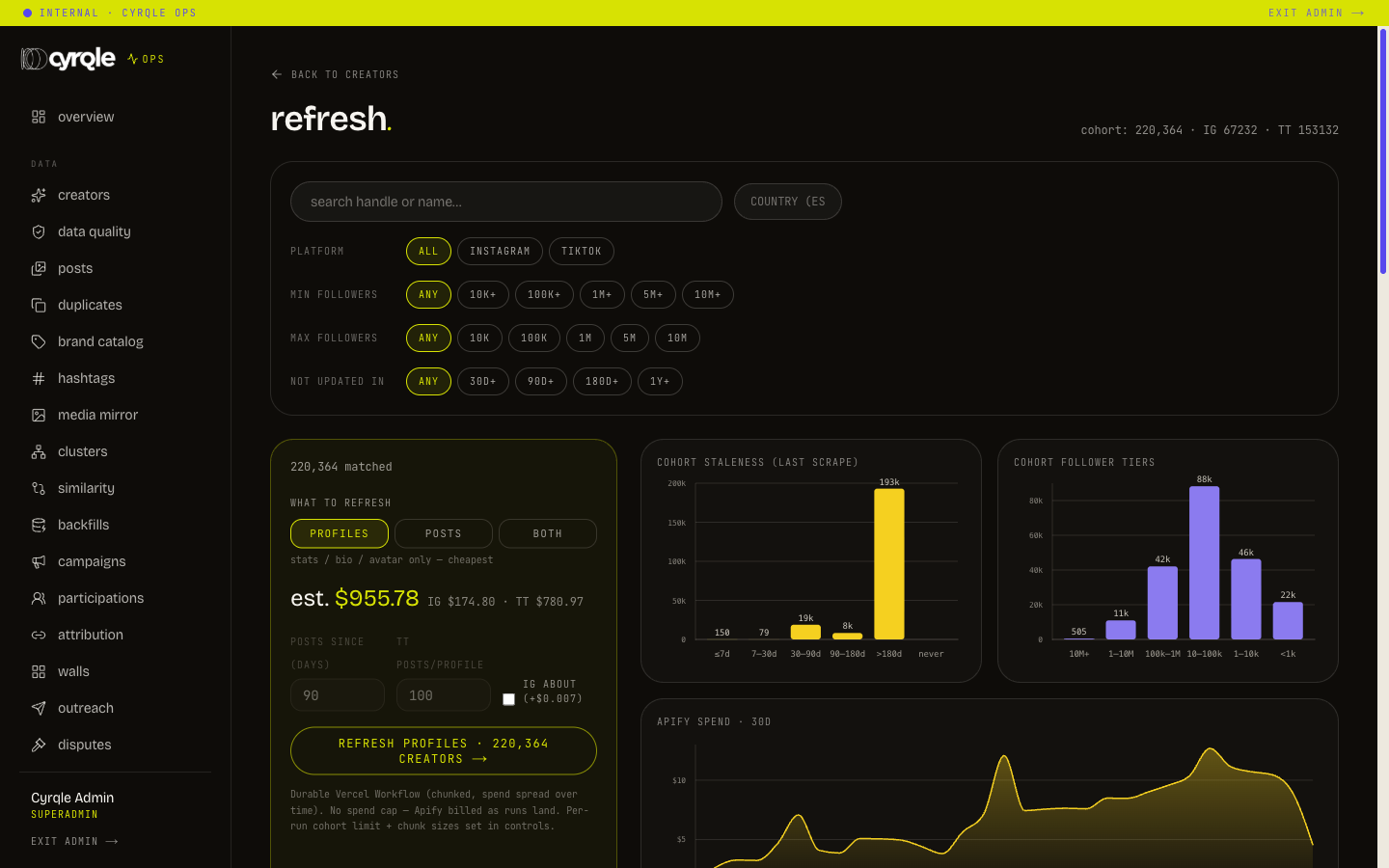
/admin/creators/refresh has two panels: a cohort panel and a pasted-handles panel.
Refresh a cohort
Bracket the cohort
Set the filters until the header reads the cohort size you intend.
Choose what to refresh
Pick profiles for stats, bio and avatar only, posts for a recent-posts window, or both.
Tune the run
Set posts since (days), TT posts/profile and the IG about (+$0.007) checkbox.
Read the estimate
The line reads "est. $X.XX" with a per-platform split. Stop here if it is higher than you expected.
Start the confirm
Click the refresh button. A confirm row opens.
Write the reason
Enter it in "reason (required, audited)…".
Queue it
Click queue (background). The run starts and you get the estimate back immediately.
- Without a reason nothing runs. The panel answers "A reason is required."
- A cohort is silently capped per platform, at 2000 by default. The only warning is the word "capped" in the result line. Narrow the filters and run again to cover the rest.
- The background run returns before any data lands. "Nothing changed" straight after queueing is normal. Do not queue it a second time.
Verify a single creator
When the cohort is 8 creators or fewer, a second button appears: refresh now (wait + verify). It waits for the run. It then reports how many creators and posts were updated, and what was spent. Use it to prove a fix on one profile.
When the cohort is larger than 8, that button is absent. The hint then reads "Narrow the filter to ≤8 creators to enable the immediate (synchronous) refresh."
Refresh pasted handles
Paste handles one per line into the handles panel. An "@" prefix and a full profile address are both accepted and stripped. A counter shows how many are valid. Set the platform, set the mode, write the reason, then click the run button. The limit is 5000 handles and duplicates are removed.
Refresh pitfalls
- When an operator has paused all data runs on /admin/controls, every refresh is refused. The message says the runs are paused by an operator, that nothing was scraped, and that no credits were spent. Check the controls page before you debug the panel.
- The Instagram about section costs an extra small amount per profile. Turn it on only when a ticket needs it.
- Support can open this page but not run anything. Support sees "Triggering refresh runs requires the data-ops role." instead of the panel.
The page also shows cohort staleness, cohort follower tiers, 30-day spend, a preview of the cohort by followers, and a table of recent runs with their cost. Read the recent-runs table after every run.
Data-quality reports
All of these are read-only. None of them changes anything.
| Screen | What it answers |
|---|---|
| /admin/creators/quality | Field coverage across the index, with a "what breaks without it" column. A gate below 95 percent turns red. Also freshness bands and orphan rows |
| /admin/creators/posts | Every post joined to its creator. Filter by handle, hashtag, platform, caption text, and whether the cover image was mirrored |
| /admin/creators/duplicates | Three shapes kept apart: split identity, recycled handle, and the same handle on two platforms |
| /admin/creators/brands | Brands and the accounts that mention them. Unresolved handles sort first, because that is the work queue |
| /admin/creators/hashtags | Tag volume, ranked by how many distinct creators use a tag, not by post count |
| /admin/creators/media | Cover-image mirror coverage, per creator, worst first |
| /admin/creators/clusters | Cluster health per lens: how much of the corpus is covered, and how big the largest cluster is |
| /admin/creators/similarity | Nearest neighbours around one handle. The match-debugging screen |
| /admin/creators/backfill | Every maintained backfill, how many rows still need it, and what to read before running it |
- Only split identity is a real duplicate. The same handle on two platforms is usually two accounts of one person, and that is correct data. Do not report it as a bug.
- Duplicates and backfills are reports on purpose. A merge moves posts, vectors, campaign history and payment history at once, so it is a transaction, not a button. A backfill is minutes to hours of writes, so it is run from a terminal by engineering.
- An unmirrored cover image is a broken picture on a customer's wall the day the platform address expires. Work the media mirror page before a launch, not after.
- One cluster holding most of the corpus is a failed run wearing a successful one's shape. Report it rather than reading it as coverage.
Creator classification
Creators are classified automatically by an hourly sweep. Until a creator is classified, they are invisible to every search surface. There is no manual labelling screen in the console.
Watch the backlog on the quality page and on the backfill page. Tune the sweep size on /admin/controls. See Platform controls.
Erase a creator
Use this when a person asks to be removed, or when Cyrqle decides to remove them.
Erasure cannot be undone by anybody, at any rank. The record of why is the reason you type, because the audit entry is not allowed to name the person. Write the reason properly.
Open the creator
Find them from Cmd-K or from /admin/creators.
Open the panel
Click Erase under GDPR. The panel is closed by default.
Choose the reason kind
Pick the person asked or our decision.
Write the reason
Enter at least 8 characters. Name the request, the date and the ticket, for example "Erasure request received by email 2026-09-05, ticket 123".
Confirm the handle
Type the creator's exact handle into the confirmation field.
Erase
Click Erase permanently.
Cyrqle decides one of two outcomes and reports which:
- Deleted. Nothing referenced this creator, so the record and everything under it is gone.
- Anonymised. A contract, payout or compensation record referenced them, so the record is kept with every identifying field cleared.
Either way the result reports how many posts were removed, how many stored files were deleted, and whether the person was already on the suppression list. They are not re-indexed by any future harvest.
The erase control is hidden for roles that cannot use it, rather than shown and refused. If you cannot see it, you are not a superadmin.
Pitfalls
- A refresh run spends money and has no ceiling. Read the estimate line before every run, including a repeat of one you ran this morning.
- An unclassified creator is invisible to every search surface. A missing creator is a classification or vector problem far more often than a ranking problem.
- The data-quality screens report. None of them fixes anything. A merge, a backfill and a cluster reseed are all run outside the console.